
Document Version: 1.0
Applies To: MultiTech Conduit AP and Conduit Gateway Platforms
Audience: Forest Rock Engineers, System Integrators, Technical Support Engineers
Overview
Packet Forwarder Mode is the most common operating mode used for LoRaWAN® gateways.
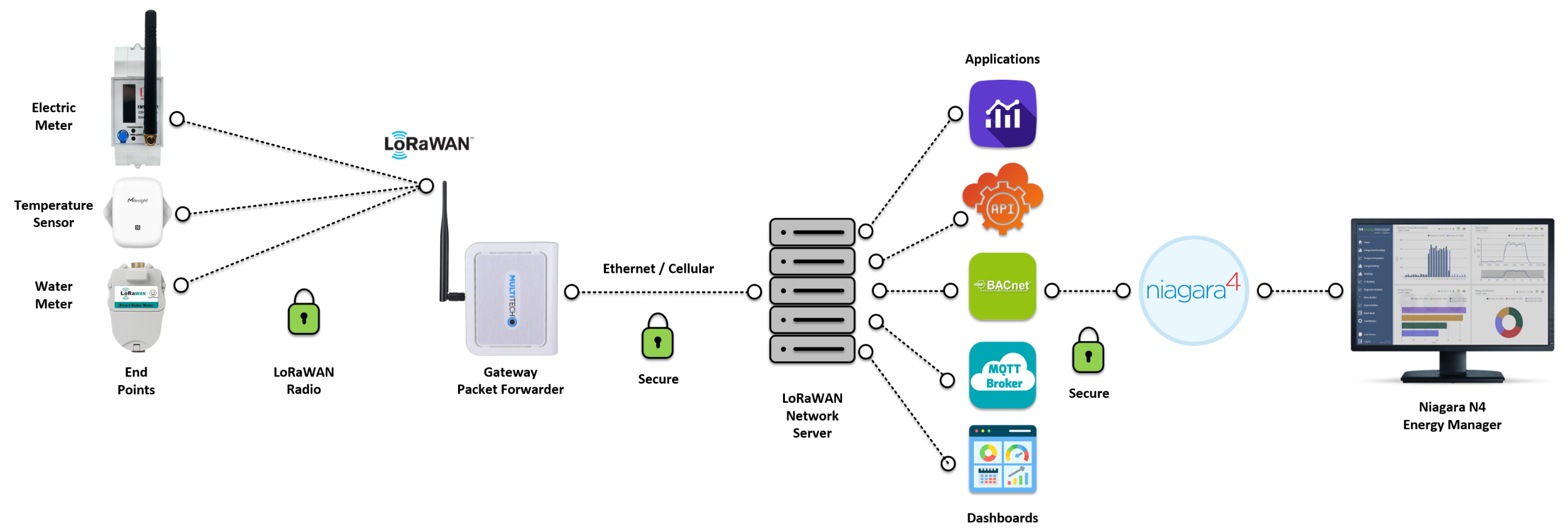
In this mode, the MultiTech gateway acts as a bridge between LoRaWAN end devices and a LoRaWAN Network Server. The gateway receives wireless packets from sensors and forwards them to the network server for processing. It also receives messages from the network server and transmits them back to LoRaWAN devices.
Typical applications include:
-
Energy monitoring
-
Environmental monitoring
-
Temperature compliance monitoring
-
Water monitoring
-
Healthcare IoT deployments
-
Smart buildings
-
Niagara N4 integrations
What is Packet Forwarding?
A LoRaWAN gateway does not typically make decisions about devices, data, security keys, or application logic.
Instead, its primary role is to:
-
Listen for LoRaWAN radio traffic.
-
Receive packets from end devices.
-
Forward those packets to a network server.
-
Receive downlink messages from the network server.
-
Transmit messages back to devices.
Think of the gateway as a radio-to-IP translator.
The network server performs the intelligence, while the gateway simply transports packets between the radio network and the IP network.
Why is a Network Server Required?
A LoRaWAN gateway alone cannot manage a LoRaWAN deployment.
The network server is responsible for:
-
Device registration
-
Join requests
-
Device authentication
-
Encryption management
-
Frame counter validation
-
Routing application data
-
Downlink scheduling
-
Device management and monitoring
Without a network server, the gateway can receive radio traffic but has nowhere to process or interpret the data.
Packet Forwarder Data Flow
When a sensor transmits data:
Temperature Sensor --> MultiTech Gateway (Packet Forwarder) --> Network Server --> Application Server --> Niagara / Dashboard / Database
Example:
-
A temperature sensor sends a reading.
-
The MultiTech gateway receives the transmission.
-
The gateway forwards the packet to the network server.
-
The network server validates and decrypts the message.
-
The application receives the temperature value.
-
Niagara or another platform like Energy Manager displays the result.
Configuring Packet Forwarder Mode
Navigate to:
LoRaWAN → Network Settings
Select:
Mode = Packet Forwarder
The gateway can then be configured to communicate with a compatible LoRaWAN network server.
Typical configuration parameters include:
-
Server Address
-
Port Number
-
Gateway ID (Gateway EUI)
-
Authentication settings
-
Frequency plan
-
Regional configuration
Common Network Server Platforms
The Things Network (TTN)
TTN is a community-driven LoRaWAN network widely used for:
-
Proof-of-concept deployments
-
Development environments
-
Education and testing
-
Smaller-scale commercial systems
Benefits:
-
Free community access
-
Large user community
-
Extensive documentation
-
Rapid deployment capability
Typical Forest Rock use:
-
Demonstration systems
-
Pilot projects
-
Engineering evaluation environments
ChirpStack
ChirpStack is an open-source LoRaWAN Network Server.
Benefits:
-
Full control of infrastructure
-
On-premise deployment
-
Private cloud deployment
-
No recurring licensing fees
-
MQTT integration support
Common use cases:
-
Hospitals
-
Corporate campuses
-
Private customer networks
-
Security-conscious environments
Typical Forest Rock use:
-
Healthcare deployments
-
Energy monitoring systems
-
Smart building solutions
DeviceHQ
DeviceHQ is MultiTech's cloud-based management platform.
DeviceHQ provides:
-
Remote monitoring
-
Gateway status visibility
-
Firmware management
-
Device inventory
-
Fleet management tools
Important:
DeviceHQ is primarily a gateway management platform rather than a full LoRaWAN network server.
It is often used alongside other LoRaWAN infrastructure depending on project requirements.
Typical Forest Rock use:
-
Fleet management
-
Remote diagnostics
-
Firmware maintenance
Commercial LoRaWAN Platforms
Commercial providers offer hosted LoRaWAN services with enterprise support.
Examples include:
-
Actility
-
Loriot
-
The Things Stack Enterprise
-
Managed private LoRaWAN services
Benefits:
-
Vendor support
-
SLA-backed hosting
-
Scalability
-
High availability
-
Enterprise security controls
Typical Forest Rock use:
-
Large healthcare estates
-
Multi-site deployments
-
Critical infrastructure projects
-
Enterprise IoT environments
Choosing the Right Platform
|
Requirement |
Recommended Platform |
|---|---|
|
Learning and testing |
TTN |
|
Private self-hosted deployment |
ChirpStack |
|
Gateway fleet management |
DeviceHQ |
|
Enterprise managed service |
Commercial Platform |
|
Multi-site healthcare deployment |
ChirpStack or Commercial Platform |
|
Proof of concept project |
TTN |
Verifying Packet Forwarder Operation
Navigate to:
Status → LoRaWAN
Verify:
-
Packet Forwarder Running
-
Gateway Connected
-
Uplink packets increasing
-
Downlink packets increasing
-
Network Server Reachable [multitech.net], [multitech.net]
Expected status:
Connected
Troubleshooting
|
Symptom |
Likely Cause |
|---|---|
|
No uplink packets |
Antenna issue or incorrect frequency plan |
|
Gateway offline |
Network connectivity issue |
|
No downlinks |
Network server not reachable |
|
Devices cannot join |
Incorrect keys or device registration |
|
Server disconnected |
DNS, routing, or firewall issue |
|
No application data |
Application integration issue |
Key Takeaway
A MultiTech gateway operating in Packet Forwarder Mode acts as a transport layer between LoRaWAN devices and a LoRaWAN Network Server. The gateway handles radio communications, while the network server manages security, device registration, message processing, and application integration. For most Forest Rock deployments, Packet Forwarder Mode is the recommended and most scalable operating configuration.