

Forest Rock haven’t pre-commissioned JACE’s in years.
The default platform credentials are tridium / niagara
There shouldn’t be a passphrase. That will only have been set when the JACE was first commissioned.
However; depending on the version, if it's asking for the default passphrase,
This should be niagara or admin depending on the version.
If the JACE has already been commissioned and your engineer is trying to copy a station on to it, and the error is saying the passphrases don’t match, it will be asking for the passphrase of the station itself.
The station inherits this from whichever platform it was created on, which could be the engineer's PC, or another PC entirely if the station has come from elsewhere.
The passphrase for a PC is set up when you install Niagara.
Connect using Niagara to a new Jace
Use the default 192.168.1.140 Jace IP to connect.
Set your PC IP address to anything between 192.168.1.1 and 192.168.1.254 (except any already used address, like the default one of the Jace).
The platform default username is tridium, password niagara
On first connection you will be required to set a platform user and password.
The process of recovering factory defaults returns the controller to the state it was in when it shipped from the factory.
This procedure describes the steps to recover factory defaults when using a terminal emulator program to access the controller’s system shell menu.
Prerequisites:
A USB-to-micro USB cable (the same cable as that used to connect a smartphone to a computer) connects the controller to your PC.
The Debug port on a controller is a standard Micro-A type USB port for debugging serial communications. For more details, refer to the JACE-8000 Install and Startup Guide.
A terminal emulator (system shell program), such as PuTTY, is installed on your PC.
CAUTION: Recovering factory defaults removes all platform and station data in the controller. Be sure to backup data before performing this procedure.
Following are a couple of scenarios for which you might choose to recover factory defaults:
While commissioning a brand new JACE, you make an error entering the default platform daemon credentials or passphrase. The result is that you cannot commission the controller. In this scenario, your only option is to recover the factory defaults.
When decommissioning the JACE, a best practice to follow is recovering the factory defaults in order to wipe all of the platform and station data in the controller.
The drawing with numbered call-outs, shown here, indicates the position of USB ports and switches behind the access door.
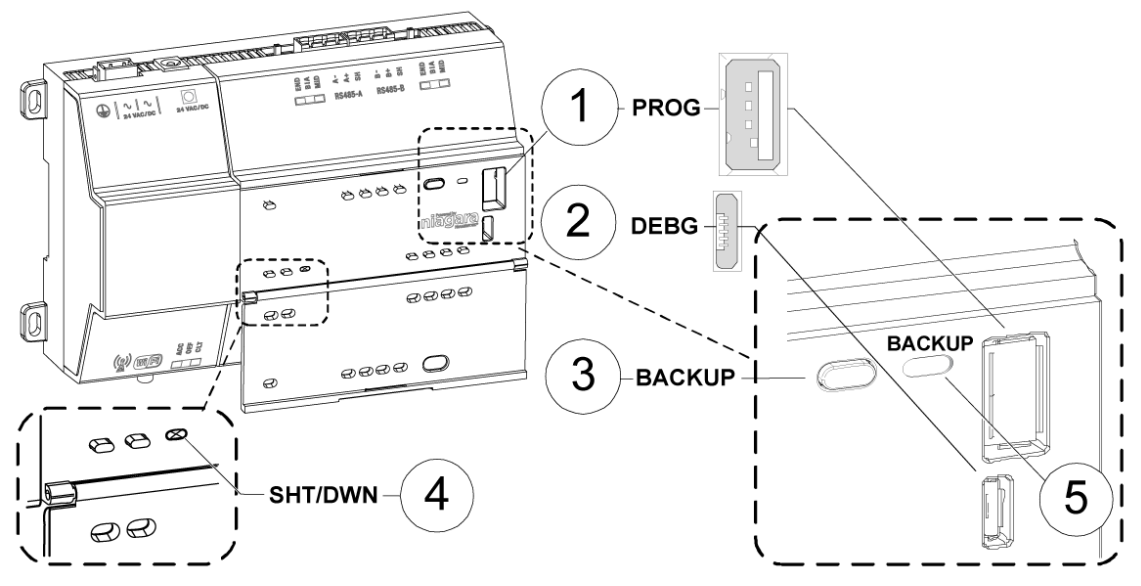
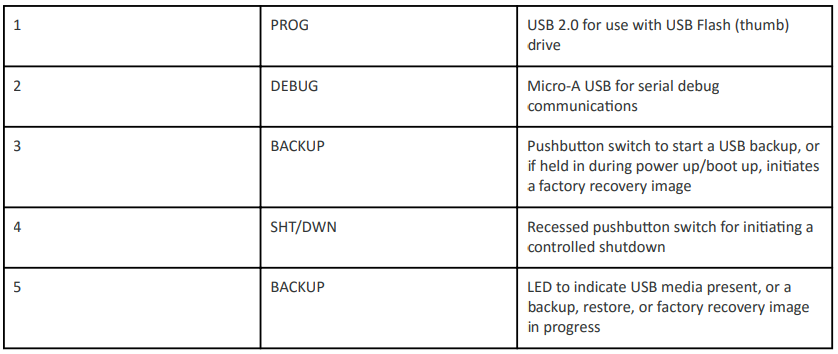
NOTE: In Niagara 4.7U1 and later, the presence of a USB device inserted in the USB backup/restore port prevents you from accidentally launching the factory defaults recovery process while attempting to restore a backup. If a USB device, of any type, is inserted in the backup/restore port, then recovery is skipped. Consequently, when factory defaults recovery is desired, no USB device can be inserted in the USB port.
NOTE: For any JACE-8000 that is converted to run NiagaraAX, the USB Backup/Restore function is not supported and USB Connector 1 (for thumb drive) is disabled. USB Connector 2 for serial shell connections is still enabled in the JACE-8000 running NiagaraAX. And although holding down the Backup button during power up/boot up still functions to initiate a factory recovery image, it restores the controller to its factory ship state which is N4.1 or later. You must repeat the conversion procedure to get it to AX-3.8U1.
-
The DEBUG port is a standard Micro-A type USB port for serial debug communications to the controller.
NOTE: Login requires administrator level platform credentials
-
The SHT/DWN push button initiates a “controlled shutdown” of the controller, ensuring that all station data is preserved.
Perform the following steps:
-
Ensure that the controller’s power is off.
-
Press and hold down the backup and restore button as you power up the controller, and continue holding down the button throughout the boot-up process until the button press is detected and the following conformation banner displays:
-
******************************************************* Backup/Restore button press detected.
NOTE: During this step of the procedure, the Backup LED flashes at medium speed (100 mS on, 100 mS off) Also, be aware that holding the button down too long results in the following message (which does not indicate a hardware fault).
If this message appears it is best to start the procedure over, beginning with step 1:
“WARNING - CHECK BACKUP BUTTON - POSSIBLE SHORT!”
-
Release the backup and restore button once the banner displays.
On detecting the button release, the system begins a 10-second countdown, which displays as shown here:
Press any key to restore from USB backup. If no key pressed, factory recovery will begin in 10 seconds Recovery begins in 9 seconds Recovery begins in 8 seconds Recovery begins in....
NOTE: Pressing any key during this 10-second countdown prevents the system from entering factory recovery mode. Instead, the system switches modes to restore from a USB backup.
When no key press is detected during the 10-second countdown, the factory recovery process begins at the moment the countdown finishes. Upon entering recovery mode, the boot process overwrites the controller with a default factory image. During this process the Backup LED blinks at slow speed (one second on, then one second off)
CAUTION: Once in recovery mode (BACKUP LED is flashing in slow blink), do not interrupt this process. Allow the recovery to complete or the controller could be left in an inoperable state.
-
When the Backup LED stops flashing turn the controller’s power off and back on again to reboot.
NOTE: After recovering factory defaults the initial controller reboot process takes longer than usual.
On completion the controller is restored to a factory default state.
Other Resources & Customer Survey:
💬 Don't miss out! Follow the Forest Rock News channel on WhatsApp Click Here!
💬 We’d also love your feedback! Please take a moment to complete our quick Customer Survey
It only takes a minute and helps us serve you better!

IoT Devices for BMS, Automation & Smart Connectivity | Forest Rock