

Agenda:
-
SD Card Issue
-
RMA Process
JACE 9000 SD CARD ISSUES
With a little planning and a few key pre-installation checks, you can avoid the most common and burning questions we hear regularly in Technical Support:
Q: “Why isn’t it booting?”
Q: “Why can’t I talk to it?”
Q: “If you power up a Niagara JACE without the SD card, does that break the JACE?”
These are all common and valid questions.
The aim of this article is to separate fact from fiction and explain the role of the SD card in Niagara JACE controllers.
A missing or improperly seated SD card will not normally cause permanent damage to the JACE. However, it can lead to unexpected behaviour and confusion during commissioning, licensing, or troubleshooting. On platforms that use the SD card as part of the controller's identity, the Host ID reported by the JACE may differ from the licensed Host ID when the card is absent. As a result, the controller may appear unlicensed, fail to run Niagara as expected, or present symptoms that can easily be mistaken for a hardware fault.
Before assuming a controller has failed, always verify that the correct SD card is installed and properly seated, and confirm that the reported Host ID matches the licensed Host ID for the device.
JACE 8000 / JACE 9000
On modern JACE-8000 and JACE-9000 controllers, the microSD card is part of the licensing and storage architecture.
-
The JACE will usually still power up and boot.
-
The reported Host ID changes when the SD card is absent.
-
Niagara licensing tied to the SD-card Host ID will not match.
-
Niagara may not run correctly, or the controller may appear unlicensed.
-
Re-inserting the original SD card and rebooting typically restores normal operation.
Tridium documentation specifically notes that a JACE-9000 without an SD card derives its Host ID from the CPU instead, and inserting/removing the SD card changes the Host ID as detailed below:
These notes apply to every JACE, including the new Wi-Fi model shipping with Niagara 4.15.
SD Card Checks and Common Faults
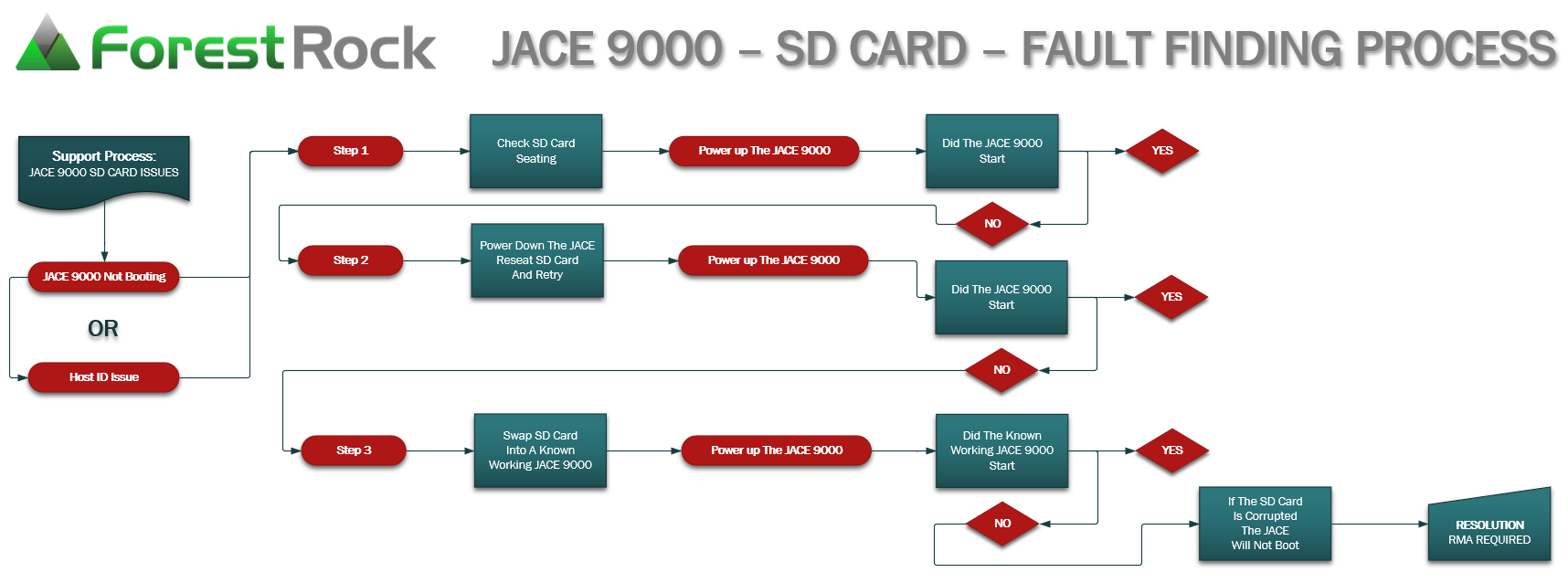
BASIC TEST:
-
JACE 9000 Fails To Boot.
CHECK THE SD CARD FIRST: Power down the suspected faulty JACE 9000.
Remove the supplied SD card and re-insert it again to check the seating in the SD card slot.
Power up the JACE 9000 again, and confirm that the Host ID now includes the SD segment printed on the SD Card case label.
-
Expected:
ATLAS-SD-abcd-efgh-ijkl-mnop -
Reported:
ATLAS-abcd-efgh-ijkl-mnop
-
If the above process fails, Swap the suspect SD card into another known working JACE 9000.
SWAP THE SD CARD TO ANOTHER JACE 9000:
Power down the suspected faulty JACE 9000.
Remove the supplied SD card and insert it into a known working JACE 9000.
Power up the known working JACE 9000, and confirm that the Host ID now includes the SD segment printed on the SD Card case label.
-
Expected:
ATLAS-SD-abcd-efgh-ijkl-mnop -
Reported:
ATLAS-abcd-efgh-ijkl-mnop
-
If the known working JACE 9000 fails to boot or reports an invalid Host ID
The card is likely faulty. RESOLUTION: RMA Required…….
We Need To Make It Quite Clear:
You should only need to RMA the SD card if you are experiencing the above issues. Most of the time when this happens we have just been sending out new SD cards and this fixes the problem, To start the RMA process, go here.
2. Host ID Issues
-
A faulty SD card can generate an incorrect Host ID from the chassis.
See: https://www.niagara-community.com/s/article/Host-ID-incorrect-Jace9000
3. Physical Seating
-
Ensure the SD card is fully seated in its holder.
-
Inspect for damage or a faulty holder.
4. Incorrect Image Loading
-
Some factory batches have JACE-8000 images mistakenly loaded onto JACE-9000 cards.
Resolution: RMA required.
5. Corrupted SD Card
-
If the card is corrupted, the JACE will not boot.
Resolution: RMA required.
6. Missing Authentication Field
-
If the encrypted authentication field is missing:
-
System shell shows blank ID and invalid media error.
-
JACE will not boot.
Resolution: RMA required.
-
7. Host ID Confusion
-
In this scenario, the user may report a Host ID mismatch:
-
Expected:
ATLAS-SD-abcd-efgh-ijkl-mnop -
Reported:
ATLAS-abcd-efgh-ijkl-mnop
-
-
Important: A license swap cannot be done for this mismatch.
Key Takeaways
-
Always verify SD card seating and integrity before assuming network or software issues.
-
If Host ID or boot errors persist after reseating, do not attempt license swaps—initiate RMA.
-
Keep a known-good JACE 9000 on hand for quick SD card testing.
This article will be updated over time to reflect new suggestions and features with the JACE 9000 Hardware
Other Resources & Customer Survey:
💬 Don't miss out! Follow the Forest Rock News channel on WhatsApp Click Here!
💬 We’d also love your feedback! Please take a moment to complete our quick Customer Survey
It only takes a minute and helps us serve you better!

IoT Devices for BMS, Automation & Smart Connectivity | Forest Rock