

Why Cellular Data Usage Spikes
Most BMS/SCADA systems are set up with aggressive commissioning defaults. If these aren’t tuned, they generate constant polling, oversized payloads, frequent discovery traffic, and heavy cloud syncing. On Ethernet this goes unnoticed, but on 4G/5G, every byte counts, and it quickly adds up to a costly monthly bill that you were not expecting.
A Forest Rock Knowledge‑Based Guide
Applies to: RUT241, RUT240, RUT955, RUT956, and similar models
Public IP SIMs: Why “Idle” Still Costs
A fixed public IP with port forwarding is convenient—but it’s also noisy by default. As soon as it’s exposed, global scanners continuously probe it. Even when your firewall blocks the traffic, those inbound packets still hit your data plan: SSH brute-force attempts, HTTP(S) floods, ICMP sweeps, port scans, and SYN floods all quietly consume bandwidth in the background.
RUTX50 Attack Prevention (what each filter does)
Open Firewall → Security → Attack Prevention. These kernel-level filters block abuse before it hits services or logs.
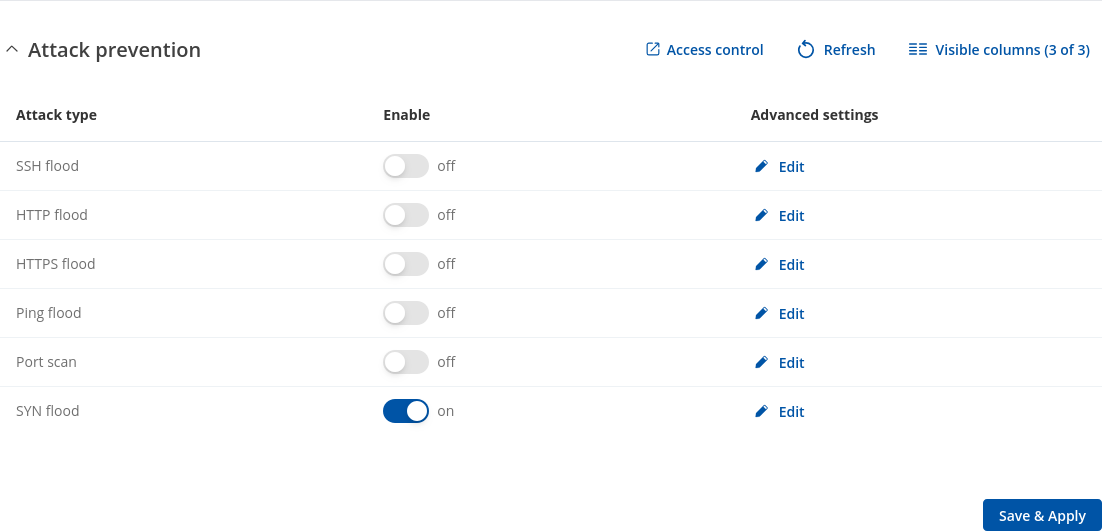
For public IP SIMs, enable them all.
RUTX50 Attack Prevention: enable SYN Flood, Port Scan and Ping Flood at minimum; ideally enable all six for public exposure.
|
Attack type |
What it blocks |
Why it matters on public IP |
Default advice |
|---|---|---|---|
|
SYN Flood |
Limits half-open TCP sessions |
Common flood; fills connection tables and wastes inbound data |
Leave ON always (all zones) |
|
Port Scan |
Sequential rapid connection attempts |
Culls internet scanners quickly |
ON for public IP |
|
Ping Flood |
Excess ICMP echo requests |
Drops ping storms at the edge |
ON for public IP |
|
HTTP/HTTPS Flood |
Request bursts to web UI |
TLS floods are expensive; blocks early |
ON (or disable WAN UI entirely) |
|
SSH Flood |
Rapid SSH attempts |
Stops brute-force noise |
ON if SSH on WAN (better: disable) |
Expected savings:
Unprotected public IP routers often idle at 500 to 1000 MB/day of junk.
With Attack Prevention enabled, idle inbound typically drops to 20 to 80 MB/day; behind private APN/VPN it’s usually <10 MB/day.
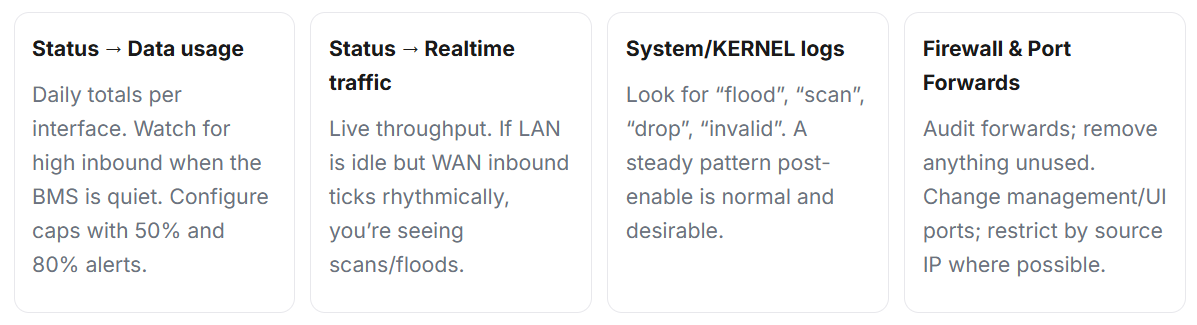
What to check in router logs and counters
Best Practice: Public IP with Port Forwarding
-
Enable protections:
Turn on all Attack Prevention filters. Keep SYN Flood protection enabled at all times. -
Lock down access:
Default-deny inbound traffic. Disable WAN UI/SSH; if required, move to high ports and restrict by source IP. -
Minimise exposure:
Only port-forward what’s essential. Avoid 22/80. Prefer a VPN; otherwise use hardened 443 or a jump host. -
Optimise BMS traffic:
Use COV with deadbands (~0.3 °C / 2% RH). Increase polling intervals (60–300 s). Batch telemetry and keep TLS sessions alive. -
Control keepalives:
Set to 60–120 s and avoid stacking multiple watchdog mechanisms. -
Cut background traffic:
Disable speed tests, TR-069 diagnostics, and OS updates over the SIM. -
Segment networks:
Isolate BMS on its own VLAN; keep CCTV and staff devices separate. -
Ensure RF quality:
Use all 4 antennas (4×4 MIMO), keep coax short/low-loss, and optimise placement (target RSRP > −90 dBm, SINR > 10 dB).
Frequently Asked Questions
Q: Why is my BMS using so much mobile data?
A: Typically due to fast polling, overly detailed logging, and frequent cloud sync. A single misconfigured job can hit ~17 GB/day. Fix intervals, enable COV, and batch traffic.
Q: What’s “normal” usage per site?
A: A well-tuned site is usually 200–400 MB/day. Significantly higher usage points to poor configuration or excessive exposure on a public IP.
Q: What should I enable on the RUTX50?
A: Enable all Attack Prevention filters. Apply default-deny on inbound traffic, remove unnecessary port forwards, and use a VPN or private APN where possible.
Q: Public IP or Private APN?
A: Public IP works but attracts constant background noise and risk. Private APN/CGNAT with VPN is quieter, uses less data, and is easier to secure.
Bottom line
Get the basics right: reduce chatter, limit exposure, and tune properly. The result—lower data use, quieter networks, clearer alarms, and fewer billing surprises.

Other Resources & Customer Survey:
💬 Don't miss out! Follow the Forest Rock News channel on WhatsApp Click Here!
💬 We’d also love your feedback! Please take a moment to complete our quick Customer Survey
It only takes a minute and helps us serve you better!

IoT Devices for BMS, Automation & Smart Connectivity | Forest Rock