

Did You Know?
Each new Teltonika device added to the RMS network has trial service which would be active for 1 month, that is valid for 2 years, to allow you to test the system and ensure you are running the latest firmware updates.
Free 5 GB of Company Data
Each new RMS company added by Forest Rock Systems will be provided with a free
5 GB of company data for testing RMS Connect and RMS VPN features. This resource is shared globally between all your remote access connections and VPN hubs / Quick connect sessions on your RMS company (on a single level).
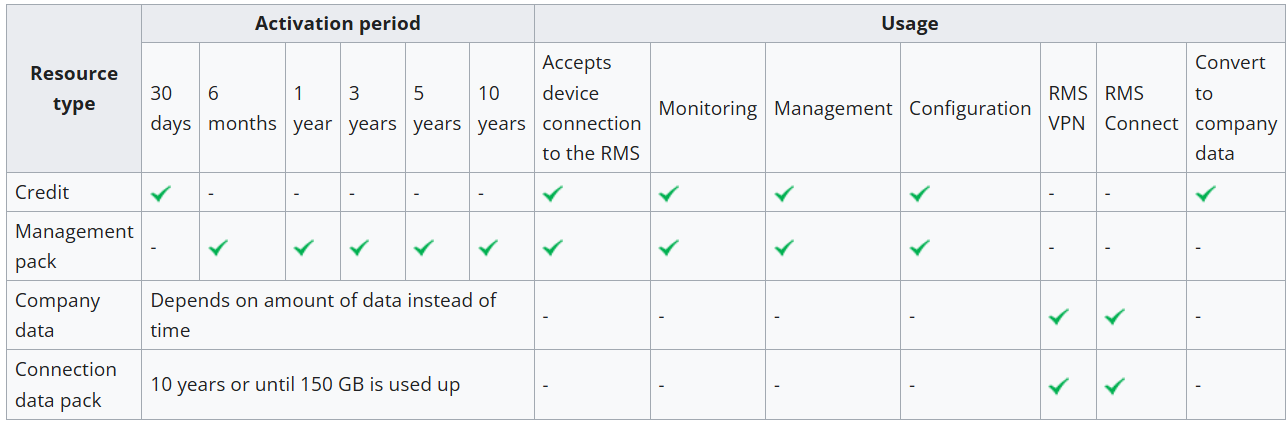
Company Data: Can be increased from your credit pool and purchased from Forest Rock.
For example: (1 credit = 2 GB of company data).
What Are Credits?
Credits are the more flexible option as they can be assigned on the single device to get it online on the RMS platform or exchanged for company data in case you need more of it. Each credit is active on a device for 30 days and would allow the device to be monitored/connected for the duration of this activation time. Remember each new device added to the system has trial service (1 Free Credit) which would be active for 1 month.
Q: What if I want to monitor my device for a longer period?
Management pack
This option is preferred by users who need constant monitoring, management, or configuration features on their devices for a long-term solution. Management packs allow the device be connected to the RMS platform for the specified time period, however, they do not provide any Connection data pack on the assigned device nor add any amount to Company's data pool.
Management packs are available with 6-month, 1-year, 3-year, 5-year, and 10-year activation periods.
A single pack can only be active on a single device, once it is activated - it can not be transferred.
Connection data pack
Connection data packs are an alternative to Company data if you expect a lot of traffic going through a RMS Connect session on a specific device or RMS VPN hub to which that device is assigned.
A device with an active data pack will have its own data pool that would take higher priority than the company data pool and will be active for a specified time period.
Connection data packs are currently available in a 10-year 150GB option.
This is often used in cases where a user would generate a lot of traffic (e.g. SFTP connection) through RMS Connect Remote access connection to end-devices or the device with data pack assigned belongs to VPN hub on which a lot of traffic is generated.
A single pack can only be active on a single device, once it is activated - it can not be transferred.
Usage in VPN hubs
RMS devices which use company data - Any RMS-connected devices added to the VPN hub should connect to the hub. In case of your RMS company running out of company data, these devices will become disabled in the VPN hub. Remember, More data can be purchased by way of credits, management packs or connection data packs. You can also set alerts for your RMS company account to alert you, in case your RMS data is running out of company data.
Comparison Table
So What is Teltonika RMS
Teltonika Remote Management System (RMS) General Overview
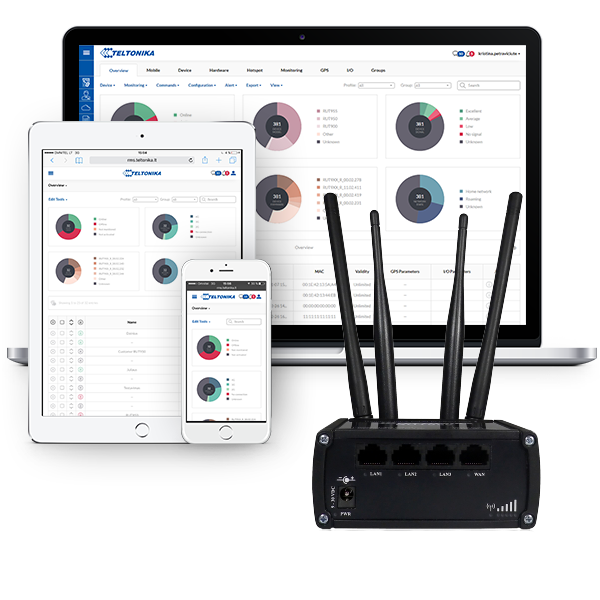
Teltonika’s Remote Management System (RMS) is a cloud-based IoT platform designed to give users full remote oversight and control of compatible Teltonika devices. Whether you’re working with 4G routers, IoT gateways, or access points, RMS provides a simple and efficient way to manage them all centrally.
How RMS Works
RMS is accessed through an easy-to-use web interface. After logging in, you’re presented with a dashboard listing all connected Teltonika devices.
Each device shows its current status (online or offline) and can be organised into structured groups called “companies” and sub-companies. This hierarchy not only keeps devices tidy but also enables controlled access, so users can be assigned permissions to manage only specific groups without visibility of higher-level systems.
Devices can be added to RMS either directly via their local interface or by entering their serial number into the platform. To enable monitoring and control, each device requires an active RMS licence credit. These credits are typically purchased in bulk from Forest Rock and are allocated on a per-device, per-month basis, with renewal handled on a rolling schedule.
All communication between RMS and connected devices is securely encrypted, meeting strict CIS v7 security standards.
Why Use RMS?
RMS is particularly beneficial for organisations managing multiple devices across different customers or remote locations. It eliminates the need for on-site visits by allowing full remote access, saving both time and operational costs.
A key feature is RMS Connect, an optional paid service that allows secure, temporary access to third-party devices on the same network. This effectively replaces traditional port forwarding by creating a proxy connection, without requiring a public IP address or complex firewall setup.
Additionally, RMS includes built-in VPN capabilities, allowing users to establish secure connections for an unlimited number of clients through the same interface.
When You Might Not Need RMS
Despite its powerful capabilities, RMS isn’t always necessary. For individual users with a single Teltonika router, such as in a home, vehicle, or boat, the platform may be excessive. RMS is best suited to larger-scale deployments involving multiple devices spread across various locations, where centralised management becomes essential rather than optional.
What Does RMS Do?
RMS gives you full visibility and control over your devices, including:
-
Remote configuration and firmware updates
-
Real-time status monitoring (signal strength, uptime, connectivity)
-
Secure remote access to devices and connected equipment
-
Alerts and diagnostics for proactive maintenance
Why Do You Need It?
Without RMS, managing Teltonika devices often means:
-
Travelling to site for configuration changes
-
Limited visibility when something goes wrong
-
Slower response times for your customers to outages or performance issues
With RMS, you can:
-
Reduce site visits and operational costs
-
Troubleshoot issues instantly
-
Keep all your devices updated and secure
-
Maintain consistent, reliable performance across your network
In short, RMS transforms Teltonika hardware from standalone devices into a fully managed, scalable connectivity solution, giving you the control, visibility, and efficiency from a single platform.
If you start to feel overwhelmed with the above knowledge article, we’re still here to help.
Drop us an email at support@forestrock.co.uk and we’ll pick it up from there.
Together, we can create a resource that benefits everyone.
Other Resources & Customer Survey:
💬 Don't miss out! Follow the Forest Rock News channel on WhatsApp Click Here!
💬 We’d also love your feedback! Please take a moment to complete our quick Customer Survey
It only takes a minute and helps us serve you better!

IoT Devices for BMS, Automation & Smart Connectivity | Forest Rock