Tridium has identified a privilege escalation vulnerability within the Niagara Program Module (program-rt.jar) A Patch for Niagara 4.14u5 and 4.15u4 is available.

“Please Update Your Niagara Software”
This Addresses A Program Module Vulnerability
Classification: Partner Advisory
Date: 16 July 2026
Priority: High
Audience: Forest Rock Partners, System Integrators, Service Engineers, Technical Support Teams
Source: Tridium Bulletin
Security Bulletin: SB 2026-Tridium-1
CVE: CVE-2026-11804
CVSS Score: 5.2 (Medium)
Overview
Tridium has identified a security vulnerability within the program-rt.jar component of specific Niagara Framework releases.
Partners operating or maintaining affected Niagara installations should review their deployed versions and apply the recommended patch as soon as practical, following their standard change management and customer notification procedures. In addition to applying the patch, Tridium recommends reviewing Niagara user accounts, restricting physical access, using secure remote-access methods such as VPNs, reviewing the Security Dashboard, and following the Niagara Hardening Guide. tri-Niagara4-Hardening-Guide-en-2025.pdf
Affected Products
The vulnerability affects the following Niagara releases:
|
Product |
Affected Version |
|---|---|
|
Niagara Framework® |
4.14u5 |
|
Niagara Enterprise Security |
4.14u5 |
|
Niagara Framework® |
4.15u4 |
|
Niagara Enterprise Security |
4.15u4 |
Versions listed are based on Tridium Security Bulletin SB 2026-Tridium-1. This advisory applies to Niagara 4.14u5 and 4.15u4 systems.
Required Remediation
Tridium has issued updated versions of the program-rt.jar module:
|
Niagara Version |
Replacement Module |
|---|---|
|
4.14u5 |
|
|
4.15u4 |
|
Partners should install the appropriate replacement JAR file corresponding to the Niagara version deployed on site.
Patch Availability
The updated JAR files have been made available via our Document Download Site:
File: Programme Module Patches
Contained files:
-
program-rt-4.14.5.22.1.jar -
program-rt-4.15.4.24.1.jar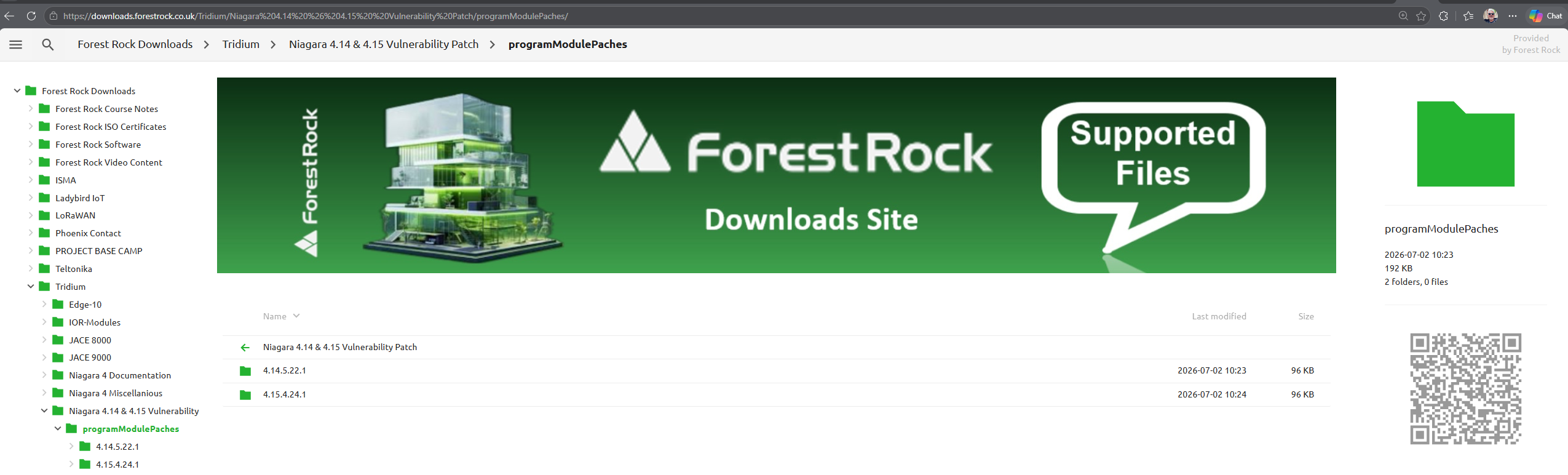
Recommended Installation Procedure
The patch can typically be applied with minimal disruption.
Before You Begin
-
Locate the existing
program-rt.jarfile on the host system.-
This will be in the modules directory of your Niagara install, typically:
-
C:\Niagara\Niagara-4.14.x\modules
-
Or
-
C:\Niagara\Niagara-4.15.x\modules
-
-
-
Verify the Niagara version installed on the target system.
-
Confirm which patch file is required.
-
Inform the customer and obtain any required maintenance approval.
-
Schedule an appropriate maintenance window if the station serves a live production environment.
-
Ensure recent station, platform and licence backups are available before proceeding.
Installation Steps
-
Stop all running Niagara stations.
-
Close Niagara Workbench.
-
Locate the existing
program-rt.jarfile on the host system. -
Replace the existing file with the patched version supplied by Tridium.
-
Restart Niagara services and stations.
-
Confirm successful station operation.
-
Review station logs for any unexpected errors or warnings.
Validation
After applying the patch:
-
Confirm stations start normally.
-
Verify alarms, schedules, histories, and integrations continue to operate correctly.
-
Check the Platform and Application Director for any module loading errors.
-
Monitor the system for a suitable period following the upgrade.
Impact Assessment
This remediation is limited to replacement of the affected program-rt.jar module and does not require a full Niagara version upgrade.
Where standard change control processes are in place, the update should be treated as a security patch and managed accordingly.
Action Required
✅ Check all Niagara deployments for versions 4.14u5 and 4.15u4.
✅ Schedule patch implementation where affected versions are identified.
✅ Follow customer notification and maintenance procedures before applying changes.
✅ Validate system operation following installation.
For further assistance, please contact Forest Rock Technical Support.
PLEASE NOTE: Alternatively, customers planning routine maintenance may choose to upgrade to Niagara 4.14u6 or 4.15u5, which already contain this security fix.
Contact Technical Support for access to the latest files
If you need more help:
Then why not contact our sales or support team.

sales@forestrock.co.uk or support@forestrock.co.ukOther Resources & Customer Survey:
💬 Don't miss out! Follow the Forest Rock News channel on WhatsApp Click Here!
💬 We’d also love your feedback! Please take a moment to complete our quick Customer Survey
It only takes a minute and helps us serve you better!

IoT Devices for BMS, Automation & Smart Connectivity | Forest Rock