
Session Overview
-
Understanding Fox
What is the Fox protocol and why does Niagara rely on it? -
Fox in Action: Remote Programming
How developers can leverage Fox for remote tasks and automation. -
Hands-On Example: Remote Point Relinquisher
A practical walkthrough of using Fox in code. -
Developer Insights & Best Practices
Tips, tricks, and gotchas for Niagara development. -
Q&A and Advanced Use Cases
Explore real-world scenarios and answer your questions.
Understanding Fox
Dive into the fundamentals of the Fox protocol, the core communication layer in Niagara Framework. Learn why Fox is essential for station-to-station communication, how it handles object serialisation, and its role in secure data exchange between Niagara components.
Understanding Fox: What is Fox in Niagara?
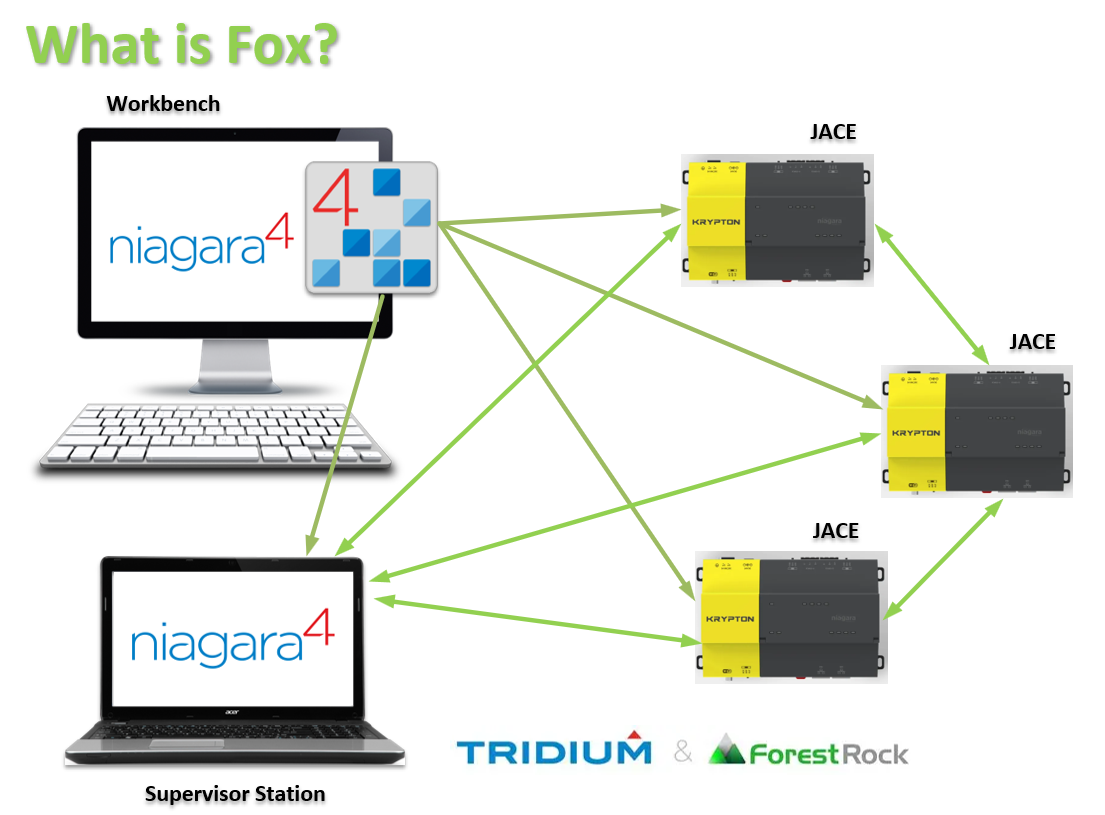
Fox is the TCP/IP protocol that underpins Niagara Framework’s internal communication. It’s designed for object-level messaging between Niagara components, enabling seamless data exchange and remote operations.
✅ Fox is Used For
-
Workbench-to-Station Communication
When you open Niagara Workbench and connect to a station, Fox handles the data exchange. -
Station-to-Station Communication (NiagaraDriver)
Stations communicate with each other using Fox for distributed architecture and data sharing.
❌ Fox is NOT Used For
-
Workbench-to-Platform Communication
(This uses HTTP/HTTPS, not Fox.) -
Station-to-Platform Communication
(Platform services rely on different protocols.) -
Browser-to-Station Communication
(Web browsers use HTTP/HTTPS for UI access.)
Types of Fox Connections
-
fox– Original, unencrypted Fox
Default port: 1911 (No longer recommended for security reasons.) -
foxs– Encrypted (secure) Fox, utilizing TLS
Default port: 4911 (Recommended for secure deployments.) -
foxwss– Encrypted Fox over WebSocket (New in Niagara 4.15)
Default port: 443 (Ideal for modern web-based integrations.)
Fox in Action: Remote Programming
Explore how Fox can be leveraged for remote programming tasks. We’ll cover how developers can use Fox APIs to interact with remote stations, push changes, and automate workflows without direct physical access to the controller.
How Can Fox Be Used in Code for Remote Programming?
Fox isn’t just for Workbench or station communication—it can be programmatically leveraged for advanced remote operations. The key is the FoxBFoxProxySession, which provides a full-fledged connection to a remote station, enabling developers to interact with it almost as if it were local.
Remote Programming over Fox
Using FoxBFoxProxySession, you can:
-
Resolve ORDs (Object Reference Descriptors)
Access remote components by their Niagara ORD paths. -
Create “Proxy” Components
Represent remote components locally for interaction and configuration. -
Run BQL or NEQL Queries
Query remote station data for analytics or control logic. -
Subscribe to Components for Live Updates
Receive real-time changes from remote points or objects. -
High-Fidelity Interaction
Configure, control, and monitor a remote station with full object model fidelity—just like working locally.
This approach is ideal for distributed Niagara architectures, where you need to manage multiple stations without direct physical access.
⚠ A Word of Caution…
Establishing a remote connection with BFoxProxySession is powerful, but it comes with additional overhead:
-
Memory Usage – Maintaining a full proxy session consumes more resources than lightweight queries.
-
Threads – Each session spawns threads for messaging and subscriptions.
-
Messaging Load – High-fidelity interaction means more traffic between stations.
✅ Best Practice
Whenever possible, use existing station-to-station features offered by NiagaraDriver instead of coding custom Fox sessions. These built-in features are optimised for performance and scalability:
-
Niagara Proxy Points
Map points from one station to another without heavy session overhead. -
History Imports
Pull historical data efficiently without maintaining a full proxy connection.
Hands-On Example: Remote Point Relinquisher
See Fox in action with a practical coding example. We’ll demonstrate how to write a Remote Point Relinquisher using Fox services, perfect for scenarios where you need to programmatically relinquish control of points across stations.
Developer Insights & Best Practices
Get insider tips for Niagara development: optimising Fox-based operations, handling security tokens, managing performance, and avoiding common pitfalls when working with distributed stations.
Q&A and Advanced Use Cases
Wrap up with a discussion. Answer common questions and explore advanced scenarios like multi-station synchronisation, secure tunnelling, and integrating Fox with custom modules.
This article will be updated over time to reflect new suggestions and features with the JACE 9000 Hardware