

Decoding in Tridium N4:
How would you convert an analog input signal from a Sontay IO-DIM-6 into 6 digital Niagara points?
The article makes use of standard kitControl blocks to decode the voltage signal from a Sontay IO-DIM6 digital input multiplexer module into Boolean writable points to represent each of its input statuses
Data Sheets From Sontay
Download full datasheets for these products below.
Execution
Make sure the IO-DIM6 output signal link is set to 0-10V and connected to an input on the controller set to read 0-10V with no conversion.
All the blocks used here are available within the kitControl palette.
Please note - the IO-DIM6 sets its voltage output to set the decoded bits to represent its inputs as follows -
-
Bit 2 = Input 1
-
Bit 3 = Input 2
-
Bit 4 = Input 3
-
Bit 5 = Input 4
-
Bit 6 = Input 5
-
Bit 7 = Input 6
Please DO NOT use bits 0 to 1, and 8 to 11
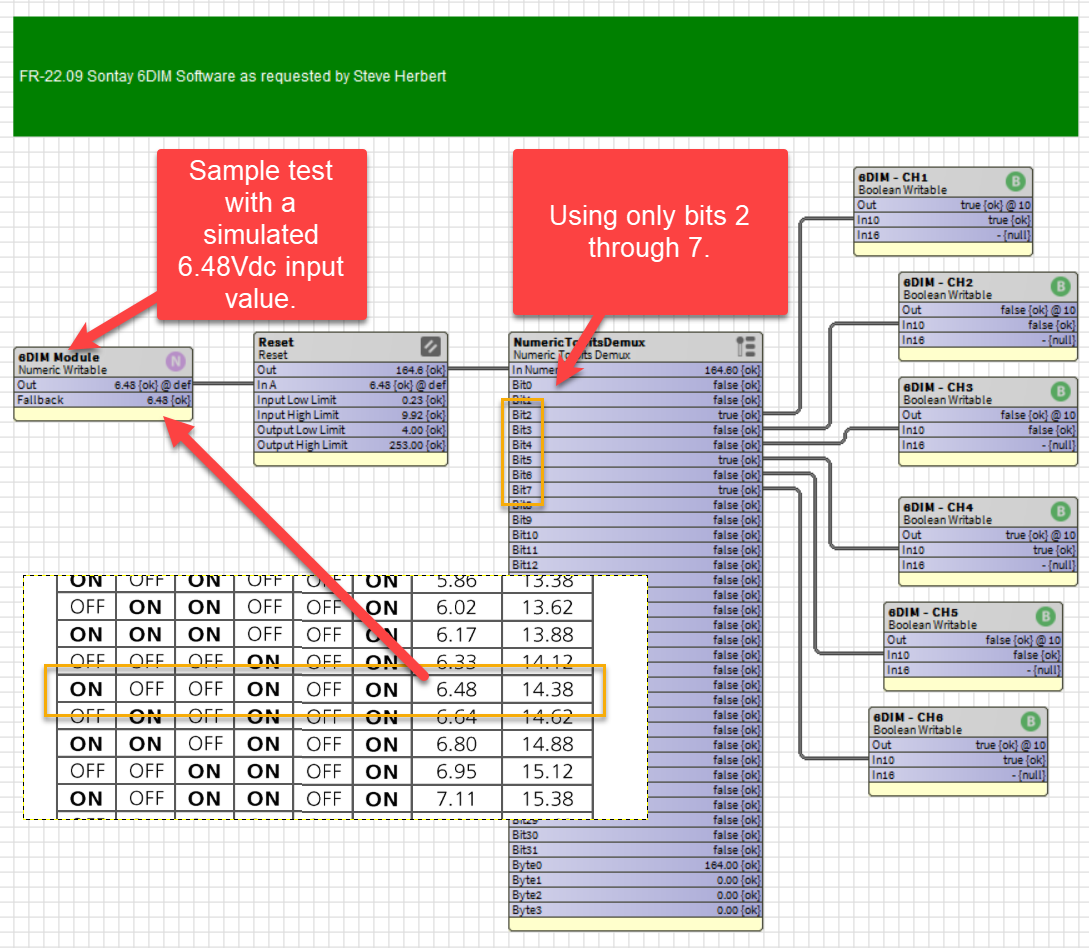
The same result can be achieved with a Program component.
Please see this article A to D Converter which will give you a good insight into how to use the Program component.