

Article ID: FR-KB-N4-EM-001
Applies To: Niagara N4, Forest Rock N4 Energy Manager, History Extensions, Aggregators
Issue Type: Historical Data
Summary
Following a migration from Niagara AX to Niagara N4, Forest Rock Energy Manager may display incomplete historical consumption data when meter readings become split across multiple Niagara histories. Although the original historical data remains stored within the station, the migrated point may begin logging to a new History ID, causing Energy Manager to treat historical and current meter data as separate datasets..
This can result in:
-
Breaks in Energy Manager charts.
-
Historical and current data appearing as separate datasets.
-
Incorrect consumption calculations.
-
Reporting inconsistencies.
This article explains how to restore data continuity by either combining multiple histories within an Aggregator or consolidating all records into a single history using the CsvToNumericHistoryImporter.
Symptoms
-
Gaps appear in Energy Manager trend charts following an AX to N4 migration.
-
Historical data only appears up to the migration date.
-
New readings appear separately from legacy consumption data.
-
Consumption totals and reports may be inaccurate.
Cause
During some Niagara AX to Niagara N4 migrations, history extensions may be recreated with a new History ID. When this occurs, subsequent meter readings are logged to the new history while the original history remains intact. Energy Manager may interpret these histories as separate data sources, resulting in fragmented consumption records. The migrated point can begin logging to a newly created history while the original history remains stored within the station. Energy Manager may treat these histories as separate data sources even though they represent the same physical meter.
-
The original history remains stored within Niagara.
-
A new history extension may be created on the migrated point.
-
Logging may begin in the new history rather than continuing in the original history.
Example
|
Period |
History |
|---|---|
|
Prior to migration |
Original AX history |
|
After migration |
New N4 history |
Energy Manager may treat these as separate data sources unless an Aggregator is configured or the histories are consolidated.
Option 1: Combine Histories Using an Energy Manager Aggregator
Suitable When
-
Both histories remain available within Niagara.
-
Historical records do not need to be physically merged.
-
Energy Manager reporting is the primary requirement.
Procedure
-
Create a new Aggregator within Energy Manager.
-
Add both the legacy AX history and the new N4 history as sources.
-
Verify timestamps do not overlap incorrectly.
-
Configure Energy Manager to reference the Aggregator rather than the individual histories.
-
Validate chart continuity and consumption calculations.
Option 2: Import Historical Data into a Consolidated History
If a single Niagara history is required, historical records can be exported to CSV and imported into a new consolidated history using the CsvToNumericHistoryImporter. This process allows data from legacy stations or split histories to be merged into a single Niagara history for reporting and analysis..
Suitable When
-
Existing reporting systems require one history only.
-
Legacy data is stored externally.
-
Data has been exported to CSV.
Procedure
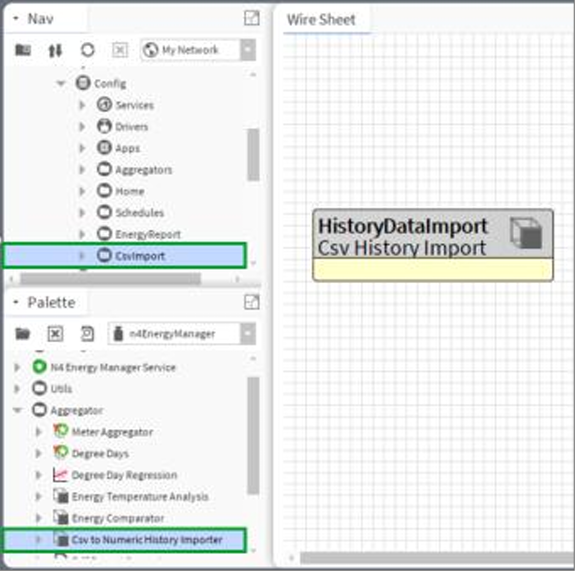
This allows historical data from legacy stations or split histories to be imported and consolidated into a new history. The importer can be configured with the appropriate timestamp format, time zone and destination History ID before running the import.
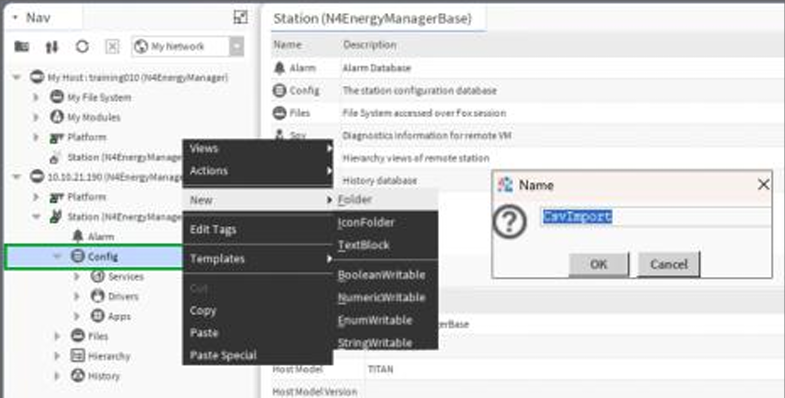
For detailed import and aggregator configuration instructions, refer to the attached guide:
N4EM_HistoryImport_Aggregators.pdf
Resolution
Historical continuity can be restored by either combining the histories logically through an Energy Manager Aggregator or physically consolidating all records into a single Niagara history using the CsvToNumericHistoryImporter. The preferred approach depends on reporting requirements and whether a single underlying history is required.:
-
Combining the legacy and migrated histories using an Energy Manager Aggregator.
-
Consolidating all records into a single Niagara history using the CsvToNumericHistoryImporter.
The most appropriate approach depends on whether a single physical history is required or whether Energy Manager reporting continuity is the primary objective.
Note: The original historical data is not lost during the migration process. In most cases, the issue arises because logging continues in a newly created History ID while the original History ID remains in the station database.
Need further assistance?
Contact the Forest Rock Support Team for guidance on consolidating histories or configuring Energy Manager aggregators.

Other Resources & Customer Survey:
💬 Don't miss out! Follow the Forest Rock News channel on WhatsApp Click Here!
💬 We’d also love your feedback! Please take a moment to complete our quick Customer Survey
It only takes a minute and helps us serve you better!

IoT Devices for BMS, Automation & Smart Connectivity | Forest Rock