

JACE Device & Capacity Licensing - Understanding Device Limits, Capacity Usage and Licence Expansion
Overview
When working with Niagara JACE controllers such as the JACE 8000 and JACE 9000, one of the most common licensing questions concerns device limits, capacity licensing, and what happens when a station exceeds its licensed capacity.
Understanding how Niagara licensing works is essential when:
-
Designing new systems
-
Expanding existing installations
-
Adding additional meters or controllers
-
Migrating stations to new hardware
-
Troubleshooting licence-related faults
This article explains how Niagara counts devices, how capacity licensing works, how to identify a device limit issue, and how to increase a JACE's licensed capacity.
What is a JACE?
A JACE (Java Application Control Engine) is a Niagara-powered hardware controller that acts as the integration and supervisory platform for a building automation system.
The JACE allows multiple systems and protocols to communicate through a single management platform, including:
-
BACnet
-
Modbus
-
KNX
-
M-Bus
-
SNMP
-
Proprietary device drivers
A typical JACE may connect to:
-
HVAC plant controllers
-
VAV controllers
-
Fan coil controllers
-
Lighting systems
-
Energy meters
-
Environmental sensors
Think of the JACE as the central translator and data hub within the building.
JACE 8000 vs JACE 9000
The JACE 9000 is the successor to the JACE 8000 and provides:
-
Improved processing performance
-
Enhanced cybersecurity features
-
TPM hardware security
-
Support for newer Niagara releases
Regardless of hardware platform, licensing principles remain largely the same and device capacity should always be verified before expanding a station.
Understanding Niagara Capacity Licensing
Niagara JACE licences include capacity restrictions that control the amount of equipment and data that may be hosted within a station.
Limits may apply to:
-
Devices
-
Capacity Units
-
Histories
-
Alarms
-
Drivers
-
Features and Options
What is a Capacity Unit?
Some Niagara licences are based primarily on device counts, while others use capacity-based licensing.
Capacity-based licences may assess overall station usage rather than simply counting physical devices. The exact calculation can vary depending on:
-
Niagara version
-
Licence type
-
Installed drivers
-
Licensed features
For this reason, engineers should always review the installed licence details within Platform Administration when assessing system capacity or troubleshooting licence-related faults.
What Counts as a Device?
In most Niagara integrations, each field device typically consumes one licensed device. However, the exact calculation depends on the specific driver and Niagara licensing model in use.
BACnet
-
VAV Controller
-
Plant Controller
-
Chiller Controller
-
Energy Meter
Modbus
-
Electricity Meter
-
Heat Meter
-
I/O Module
-
Third-Party Controller
Other Networks
The same principle usually applies to:
-
KNX integrations
-
M-Bus meters
-
LonWorks devices
-
SNMP endpoints
Example
A system containing:
-
1 Air Handling Unit Controller
-
12 VAV Controllers
-
2 Energy Meters
-
1 Boiler Controller
would typically consume: 16 devices
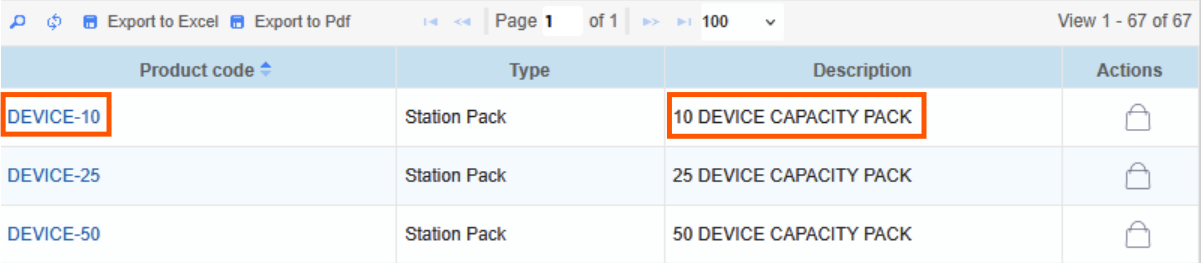
A JACE licensed for only 10 devices would require a licence upgrade before additional devices could be added.
-20260904-124647.png?cb=4084ba173ea623a080d76cc2e3ab9908)
Device Licensing vs Point Counts
What Are Device Limits?
Device limits determine how many field devices a JACE is licensed to communicate with.
A device limit refers to the number of controllers or connected devices a JACE can support under its license.
A JACE may be licensed for
-
5 devices
-
10 devices
-
25 devices
-
100 devices
-
200+ devices
Why it matters: Each BACnet controller, Modbus meter, or other connected controller typically counts as one device.
Example: A system might include:
-
1 air handler controller
-
12 VAV controllers
-
2 energy meters
-
1 boiler controller
That equals: 16 devices
If your JACE licence only allows 10 devices, you would need to upgrade the licence in order to communicate with the full system.
Why device limits exist
-
Small buildings
-
Medium commercial systems
-
Large campuses
Bottom line: Device limits help scale Niagara systems appropriately, so integrators can choose the right license for the size of the job instead of oversizing the hardware from the start.
What Are Points?
Points are the individual pieces of data coming from the devices connected to the system.
If devices are the pieces of equipment, then points are the individual values being monitored, displayed, trended, or controlled within those devices.
*Depending on the licence model and driver type, points may contribute towards overall capacity usage. Engineers should always refer to the installed licence and Niagara licensing documentation when assessing capacity requirements.
Examples of points include
-
Space temperature
-
Fan status
-
Damper position
-
Airflow readings
-
Alarm signals
Why it matters: Each device may contain dozens or even hundreds of points, depending on how much information is being brought into the JACE.
Example: A VAV controller might contain:
-
Space temperature
-
Setpoint
-
Airflow
-
Damper command
-
Occupancy status
That could equal 10–30 points for a single device.
The JACE processes these points for
-
Graphics
-
Alarms
-
Trending
-
Logic
-
Energy reporting
Bottom line: Points represent the actual data inside the system, and while they are different from device counts, they still play a major role in overall system performance and usability.
Why Capacity Matters
Even when a JACE remains within its licensed device count, excessive point counts and integration volumes can create performance issues.
Large systems should always be assessed for:
-
Number of devices
-
Number of points
-
Histories
-
Alarm extensions
-
Px pages
-
Data collection rates
Exceeding practical capacity limits may result in:
-
Slower station performance
-
Increased memory utilisation
-
Delayed graphics updates
-
History collection issues
-
Driver communication performance degradation
For larger systems, a distributed architecture using multiple JACEs and a Supervisor is often the preferred solution.
How to Check Your Current Licence
To view installed licensing information:
-
Connect to the JACE Platform.
-
Open Platform Administration.
-
Navigate to License Manager.
Review the configured capacities.
Typical entries may include:
-
Licensed devices: 100
-
Current Usage: 82
-
Remaining Capacity: 18
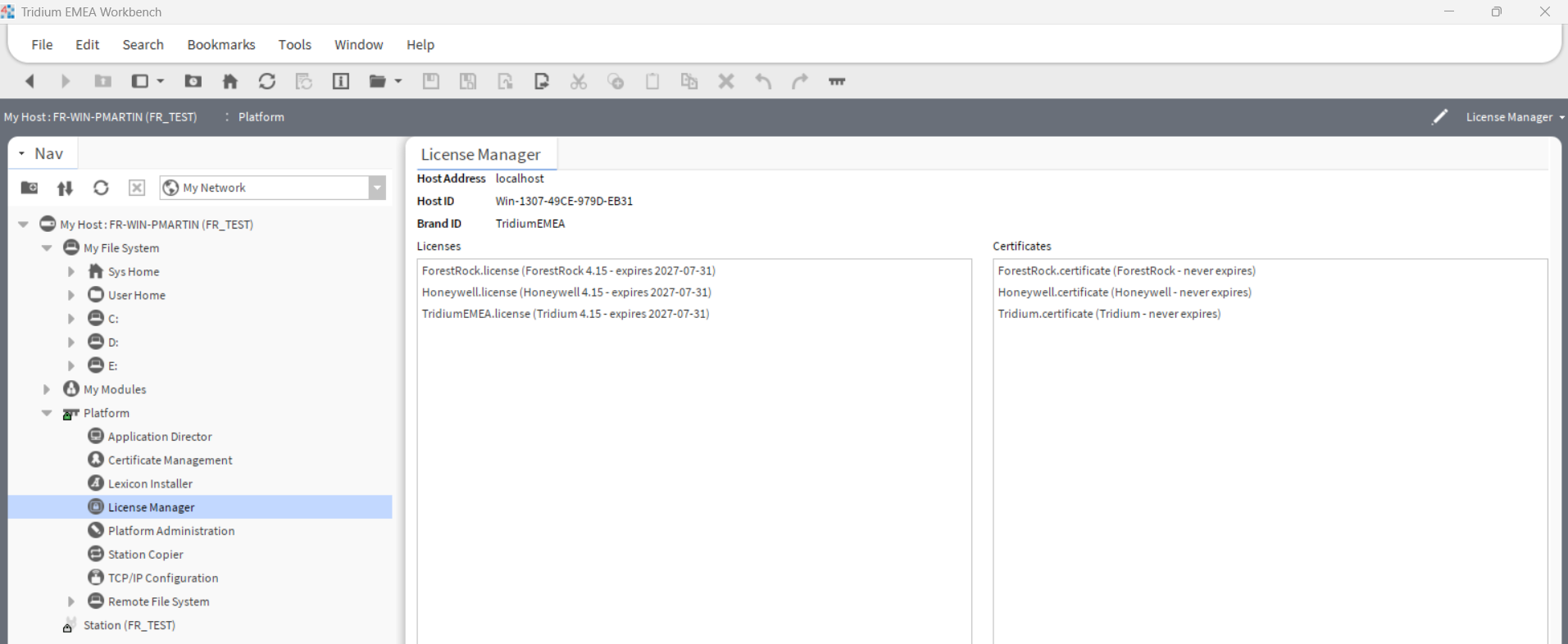
Capacity values may vary depending on Niagara version and licence model.
Symptoms of a Device Capacity Issue
When a station reaches or exceeds its licensed capacity, engineers may observe:
Licensing Alarms
Examples include:
-
Device Limit Exceeded
-
Licensed Device Capacity Exceeded
-
Capacity Violation Detected
Unable to Add New Devices
You may find that:
-
Discovery succeeds
-
Device creation fails
-
Newly added devices remain faulted
Driver Faults
Network drivers may generate warnings indicating:
-
Capacity Limit Reached
-
Device Cannot Be Licensed
-
Insufficient Licensed Capacity
Station Log Messages
Evidence can often be found within:
-
Application Director
-
Station Logs
-
Platform Logs
-20260904-125154.png?cb=e4b77edf73c8a06b5105ffc62f07ff2a)
Troubleshooting a Device Limit Exceeded Fault
If a device limit alarm is present:
Step 1 - Verify Current Licence Capacity
Check the JACE licence using License Manager and note:
-
Licensed Device Count
-
Current Device Usage
Step 2 - Review Installed Devices
Review all configured devices under:
Config
└─ Drivers
├─ BACnet Network
├─ Modbus Network
├─ KNX Network
└─ Other Networks
Count all enabled and configured devices.
Step 3 - Remove Unused Devices
Where appropriate:
-
Delete obsolete controllers
-
Remove unused meters
-
Remove historical test devices
-
Clean up temporary commissioning devices
Deleting unused devices can restore available licence capacity.
Simply disabling a device may not free capacity, as the device still exists within the station database.
Step 4 - Check for Recent Site Expansion
Common causes include:
-
Additional tenant metering
-
New HVAC plant
-
Lighting integrations
-
Energy monitoring upgrades
-
Additional floor controllers
Often the site has simply outgrown its original licence allocation.
Expanding Device Capacity
When additional capacity is required, the JACE licence must be upgraded.
Information Required
Before requesting a licence upgrade, gather:
-
JACE model number
-
Host ID
-
Niagara version
-
Existing licence details
-
Current device count
-
Required new capacity
Example:
-
Current Licence: 50 devices
-
Required Capacity: 100 devices
Obtaining a New Licence
Provide the above information to Forest Rock or your authorised Niagara distributor.
An updated licence file will be generated specifically for the JACE Host ID.
Typical licence files are supplied as:
-
license.lic
Installing the New Licence
-
Connect to the JACE Platform.
-
Open License Manager.
-
Install the new licence file.
-
Restart the station if required.
-
Confirm the updated capacity is displayed correctly.
Software Maintenance Agreement (SMA)
A Software Maintenance Agreement (SMA) provides access to supported Niagara software updates and maintenance releases.
An active SMA typically enables access to:
-
Niagara version upgrades
-
Security updates
-
Software maintenance releases
-
Technical support eligibility
-
Certain licence modifications and updates
Without an active SMA:
-
Software upgrades may be restricted
-
Security updates may not be available
-
Certain licence upgrades, software upgrades and maintenance activities may require an active SMA. Contact Forest Rock to confirm available options for your system.
When planning future system growth, SMA status should always be reviewed alongside current capacity usage.
Best Practices
Leave Spare Capacity
Avoid running a JACE at maximum licensed utilisation.
Recommended practice:
-
Maintain at least 10-20% spare device capacity.
Account for Future Expansion
During design:
-
Count current devices
-
Include planned expansion
-
Consider future metering requirements
-
Allow for replacement controllers
Monitor Capacity Regularly
Review licence utilisation whenever:
-
New devices are added
-
Major refurbishments occur
-
Additional integrations are introduced
Early identification prevents unexpected licensing alarms during commissioning.
Frequently Asked Questions
Does deleting a device free licence capacity?
Yes. Removing a device from the station normally reduces the licensed device count.
Does disabling a device free licence capacity?
Usually no. Disabled devices generally remain part of the station configuration and may still consume licensed capacity.
Are points the same as devices?
No. Devices are field controllers or integration endpoints. Points are the individual data values within those devices.
Can a licence be moved to another JACE?
No. Niagara licences are generated against a specific Host ID and cannot normally be transferred directly between controllers.
Summary
A Niagara JACE licence determines how many devices and capacity units can be hosted within a station. As systems grow, it is common to encounter Device Limit Exceeded alarms when the licensed capacity is reached.
When this occurs:
-
Verify the installed licence.
-
Review the actual device count.
-
Remove any obsolete devices.
-
Upgrade the licence if additional capacity is required.
Proper capacity planning during system design helps avoid unexpected licensing restrictions and ensures long-term scalability, performance, and maintainability of the Niagara system.
When to Contact Forest Rock
Contact Forest Rock Technical Support if:
-
A Device Limit Exceeded fault remains after device removal
-
The licence appears inconsistent with the installed system
-
A Host ID has changed following hardware replacement
-
Additional device capacity is required
-
Assistance is needed applying an updated licence
This article will be updated over time to reflect new suggestions and features with the JACE 9000 Hardware

Other Resources & Customer Survey:
💬 Don't miss out! Follow the Forest Rock News channel on WhatsApp Click Here!
💬 We’d also love your feedback! Please take a moment to complete our quick Customer Survey
It only takes a minute and helps us serve you better!

IoT Devices for BMS, Automation & Smart Connectivity | Forest Rock