
A common question that some customers ask when using the NRIO IO-R-36 & NRIO IO-R-36 modules is how to connect & wire them up.
The most popular method is by plugging the modules end to end into the side pin slot, however there may be a need to wire them in a daisy chain if the panel space does not allow the traditional method to communicate with each other or if the module(s) are wired remotely in another nearby panel.
In the Tridium FAQ document it describes what the pins are and has been extracted for the purpose of this article to show the pin out connections.
Q: What is the side connector on the IO R used for?
A: It contains five (5) signals. Three (3) pins for RS485 (+,-,S), two (2) pins for power (+,-).
The connector is utilized for:
Connecting the network from the IO R
back to the JACE 8000
Run RS485 and power signals to
adjacent DIN rails
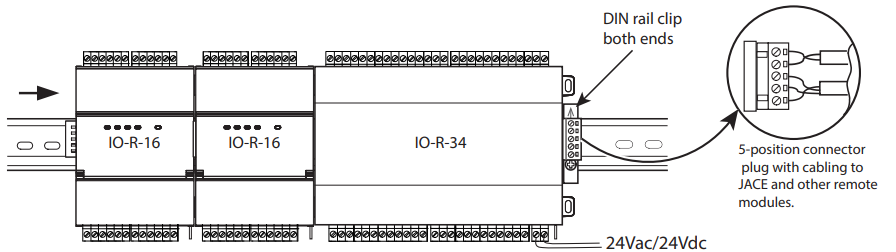
The picture above demonstrates the two ways in which you can wire them.
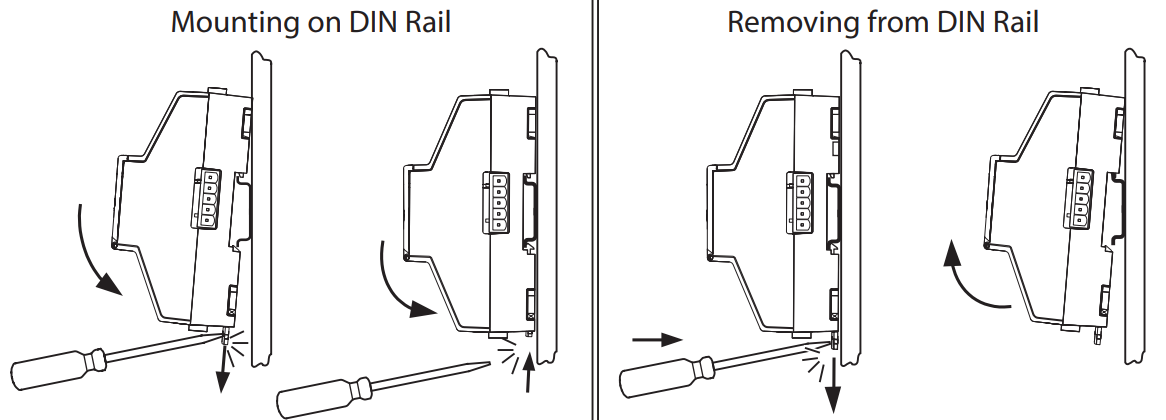
NOTE: To remove an IO-R-16 or IO-R-32 from a DIN rail, remove DIN rail end clips or stops (if applicable) and slide the module away from the other modules. Move the plastic locking tab down to the open position and then lift the module outwards.