

Configuring and Troubleshooting NTP in Niagara
This guide walks you through the process of configuring NTP servers and validating JACE time synchronisation within the Niagara Framework.
Before proceeding, it is strongly recommended to review the official Niagara documentation.
NTP functionality and configuration are thoroughly covered in the Niagara Platform Guide, which is regularly updated and may include newer or more detailed information than what is provided here.
Guide: Niagara Platform Guide.pdf
What if your site doesn't have internet access or an NPT server?
Use a Supervisor as the time source on the secure side (assuming one is installed)
If the site has a Niagara Supervisor on the same isolated network, the Supervisor can act as the single NTP server for the JACEs. This keeps everything contained inside the secure LAN and avoids the need for external time. This is often the cleanest solution for large multi controller sites.
Use a router or firewall appliance that already provides NTP
Many industrial firewalls and routers provide local NTP services by default.
If the secure network already has hardware from Cisco, Sophos, WatchGuard, Teltonika or similar, you can often enable the internal time service at no extra cost.
Use a dedicated DIN rail NTP time server
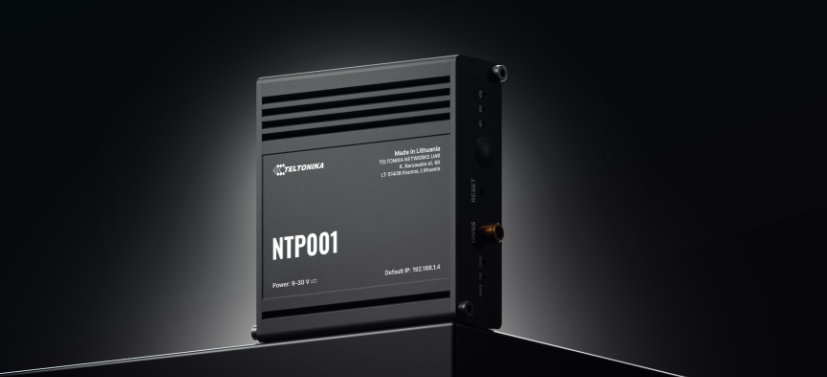
Meet the Teltonika NTP001
The NTP001 is a stratum-1 Teltonika NTP server designed for synchronising accurate, UTC-traceable time in both public and private networks, without the need of Internet access. Utilising its GNSS capabilities, this low-cost NTP server maintains precise, UTC-traceable time. Plug-and-play functionality, a wide variety of interfaces including RS232 and RS485, and a robust security profile all make the NTP001 the perfect NTP server for your network.
MULTIPLE INTERFACES
Featuring RJ45, RS232, RS485 & I/Os
Using the NtpPlatformServiceQnx spy page
-
Right-click the NtpPlatformServiceQnx and select Views > SpyRemote.
-
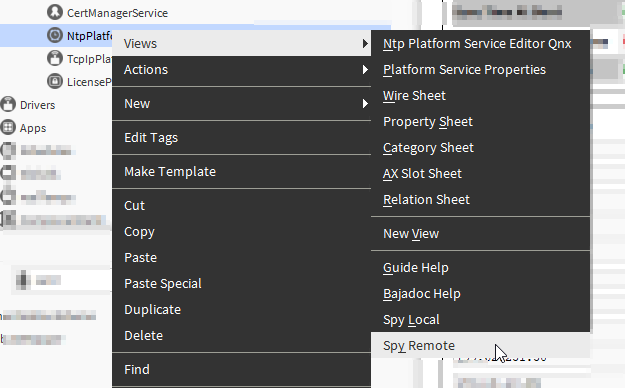
As you scroll down the first section of interest is the one that shows the NTP Configuration File. It reads what we've written to the file ntp.conf and displays it.
-
NTP Configuration File#/home/niagara/etc/ntp.conf: Niagara Network Time Protocol Configuration File
#Use the NtpPlatformService UI to modify this file.
#Created: 24-Sep-19 4:53 PM EDT
#
#Niagara NtpPlatformService variable, do not modify
#ntpEnabled true
#syncAtBoot true#server list
server 192.168.1.2 burst prefer
server 192.168.1.3 burst
server 192.168.1.4 burst
peer 192.168.1.5
peer 192.168.1.6
#ntp features enabled
enable ntp stats#ntp panic value, if offset exceeds this, ntpd should exit (disabled if 0)
tinker panic 0#gather information about statistics
statistics clockstats loopstats
filegen clockstats file clockstats type none nolink enable
filegen loopstats file loopstats type none nolink enable -
The next section of interest is for the NTP Daemon Log. You'll only see this section if Generate NTP Statistics is set to true. It's generally not necessary to consider these statistics.
Generate NTP StatisticsJan 30 08:45:14 nto ntpd[8740900-1]: receive: Unexpected origin timestamp 0xe1dd1553.126c40f0 does not match aorg 0000000000.00000000 from sym_active@172.16.10.197 xmt 0xe1dd161a.aa0c9b85
Jan 30 08:46:14 nto ntpd[8740900-1]: receive: Unexpected origin timestamp 0xe1dd1552.126c471e does not match aorg 0000000000.00000000 from sym_active@172.16.10.99 xmt 0xe1dd1656.2b9be356
Jan 30 08:46:18 nto ntpd[8740900-1]: receive: Unexpected origin timestamp 0xe1dd1553.126c40f0 does not match aorg 0000000000.00000000 from sym_active@172.16.10.197 xmt 0xe1dd165a.aa0c9453
Jan 30 08:47:18 nto ntpd[8740900-1]: receive: Unexpected origin timestamp 0xe1dd1552.126c471e does not match aorg 0000000000.00000000 from sym_active@172.16.10.99 xmt 0xe1dd1696.2b9bca8b
Jan 30 08:47:22 nto ntpd[8740900-1]: receive: Unexpected origin timestamp 0xe1dd1553.126c40f0 does not match aorg 0000000000.00000000 from sym_active@172.16.10.197 xmt 0xe1dd169a.aa4e33f0
Jan 30 08:48:22 nto ntpd[8740900-1]: receive: Unexpected origin timestamp 0xe1dd1552.126c471e does not match aorg 0000000000.00000000 from sym_active@172.16.10.99 xmt 0xe1dd16d6.2b9bd269
Jan 30 08:48:29 nto ntpd[8740900-1]: receive: Unexpected origin timestamp 0xe1dd1553.126c40f0 does not match aorg 0000000000.00000000 from sym_active@172.16.10.197 xmt 0xe1dd16dd.aa8fa9b9
Jan 30 08:49:27 nto ntpd[8740900-1]: receive: Unexpected origin timestamp 0xe1dd1552.126c471e does not match aorg 0000000000.00000000 from sym_active@172.16.10.99 xmt 0xe1dd1717.2b9bcbe9
Jan 30 08:49:34 nto ntpd[8740900-1]: receive: Unexpected origin timestamp 0xe1dd1553.126c40f0 does not match aorg 0000000000.00000000 from sym_active@172.16.10.197 xmt 0xe1dd171e.aad12b7e
Jan 30 08:51:18 nto ntpd[8740900-1]: receive: Unexpected origin timestamp 0xe1dd1203.21caf133 does not match aorg 0xe1dd175e.153d05cf from sym_active@172.16.11.205 xmt 0xe1dd1786.c4cb59c2
Jan 30 08:51:33 nto ntpd[8740900-1]: receive: Unexpected origin timestamp 0xe1dd11bb.218961dc does not match aorg 0xe1dd175c.153d0991 from sym_active@172.16.10.171 xmt 0xe1dd1795.1de9a94c
Jan 30 08:51:40 nto ntpd[8740900-1]: receive: KoD packet from 172.16.10.158 has a zero org or rec timestamp. Ignoring.
Jan 30 08:52:44 nto ntpd[8740900-1]: receive: KoD packet from 172.16.10.158 has a zero org or rec timestamp. Ignoring. -
The next section is NTP Daemon Drift. After NTP has synchronised with reliable time servers for a significant amount of time, it will write the calculated drift (in PPM) to a file, such that it can initialise with this value on reboot. It will use this calculation of how far the clock drifts, to correct the clock in real-time, in increments too small for any application to detect.
NTP Daemon Drift20.185 -
NTP Daemon Clock Stats is next. It reads what is in the clockstats file. In this example output, the file does not exist and the spy page tells us so.
NTP Daemon Clock Stats
Modified Julian Day | Secs. Past UTC Midnight | Clock Address | Last Time Code
Error reading /var/run/ntpdstats/clockstats: /var/run/ntpdstats/clockstats (No such file or directory) -
The final section of interest is NTP Daemon Loop Stats. If you're not getting data here, then the configured servers/peers might not be reachable.
NTP Daemon Loop StatsModified Julian Day | Secs. Past UTC Midnight | Time Offset Secs. | Drift Compensation | Estimated Error | Stability | Polling Interval
58860 29871.775 0.000000000 20.226 0.000976563 0.000000 6
58860 30081.780 0.000753215 20.226 0.000976563 0.000000 6
58860 30150.781 0.000753034 20.226 0.000976563 0.000000 6
58860 30688.793 0.000018819 20.227 0.000976563 0.000213 6
58860 31155.803 -0.000220479 20.220 0.000976563 0.002179 6
58860 31221.804 0.002128888 20.229 0.001234668 0.003595 6
58860 31233.872 -0.001539013 20.228 0.001736532 0.003385 6
58860 31385.925 -0.000336908 20.225 0.001679057 0.003345 6
58860 31498.941 0.000431773 20.228 0.001608116 0.003294 7
58860 31841.815 0.000467697 20.230 0.001543370 0.003195 7
58860 32276.675 0.000795988 20.235 0.001484403 0.003499 7
58860 32546.942 0.009518751 20.274 0.003382136 0.013979 7
58860 32666.611 0.000412569 20.274 0.004513791 0.013078 7
Another example I found:
LANTIME M500 - Time and Frequency Synchronization in Rail Mount Chassis
There are compact DIN rail time servers designed for OT networks.
They cost less than a full PC, operate silently, and can be powered from the same panel as the JACE.
This is a strong option where IT will not expose any existing devices on the secure side.
Other Resources & Customer Survey:
💬 Don't miss out! Follow the Forest Rock News channel on WhatsApp Click Here!
💬 We’d also love your feedback! Please take a moment to complete our quick Customer Survey
It only takes a minute and helps us serve you better!

IoT Devices for BMS, Automation & Smart Connectivity | Forest Rock