

Training Guide & Technical Documentation
Understanding Intelligent Dry Cycling Prevention
The kitControl components in N4 workbench give you the flexibility to model control systems logic that will fit your unique building control needs. This training guide is designed to help you go beyond the basic theory, by offering a practical tried and tested example of boiler control that is a scalable and is a reusable solution for real-world applications.
How Advanced Boiler Control Works
The Basic Principle
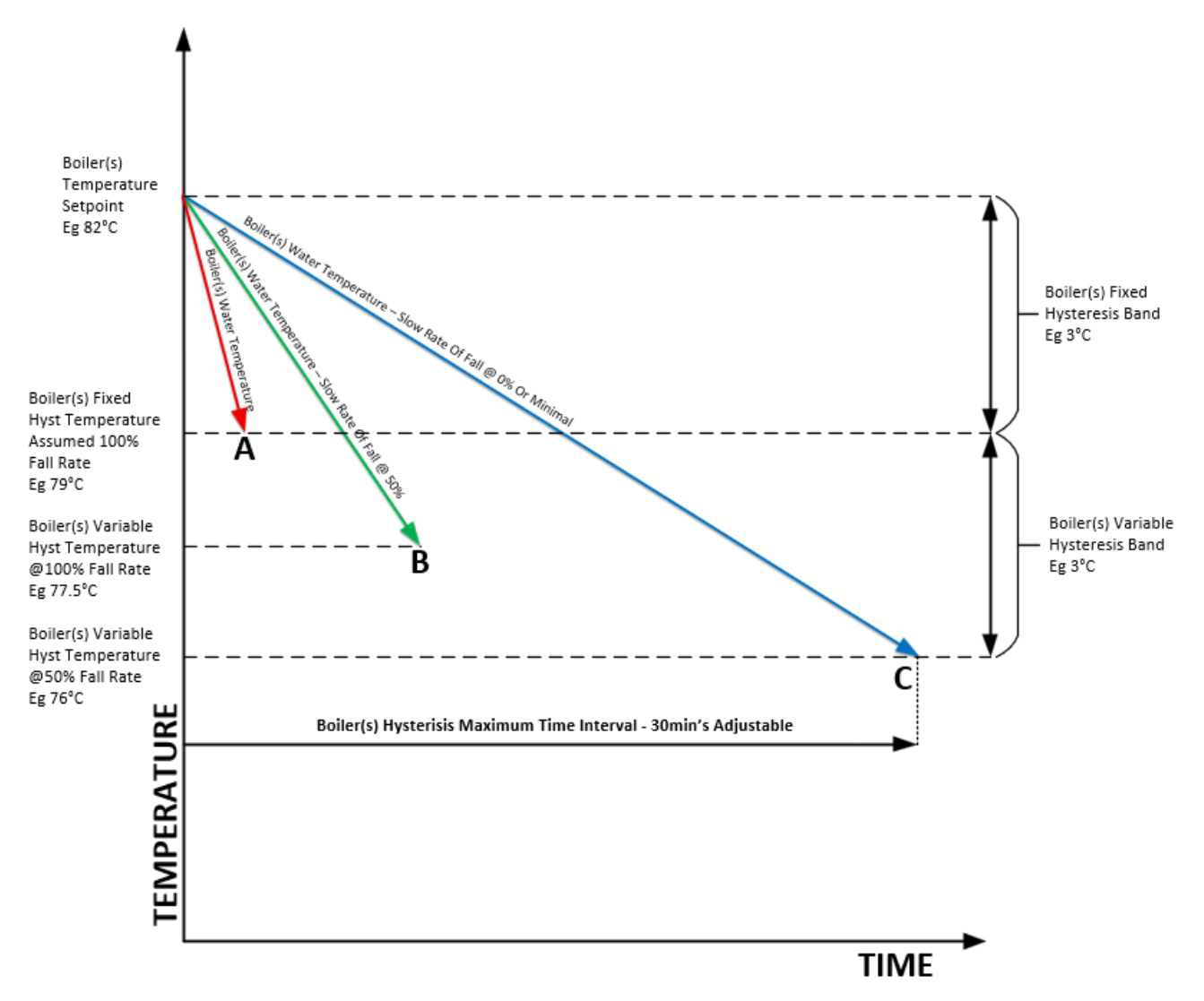
When the boiler reaches its temperature setpoint and shuts off, the water temperature begins to fall as heat is drawn off by the building. ABC measures this rate of temperature fall and uses it to determine when the boiler should restart.
The key insight: A fast temperature drop indicates high heating demand (cold weather, many zones calling), while a slow drop indicates light demand. By measuring this rate, ABC can intelligently decide how long to wait before restarting the boiler.
Temperature Fall Rate Calculation
ABC calculates the rate of temperature fall at regular intervals - either every 1 minute or every 5 minutes (user selectable). The system tracks the maximum rate observed across the four most recent calculations.
Example:
-
First calculation: Temperature falls 2°C in 5 minutes = 0.4°C/min (this becomes the initial maximum)
-
Second calculation: Temperature falls 3°C in 5 minutes = 0.6°C/min (new maximum)
-
Third calculation: Temperature falls 1.5°C in 5 minutes = 0.3°C/min (kept as 50% of maximum)
The system remembers that 0.6°C/min is the fastest drop rate it has seen and uses this as the reference for determining when to restart.
Hysteresis Bands - The Smart Re-start Logic
ABC uses two temperature bands below the setpoint to determine when to restart the boiler. Two user adjustable parameters are available to set the temperatures at which the boiler(s) will then be enabled again depending on prevailing conditions. These are:
Fixed Hysteresis Level
“Boiler[s] Fixed Hyst Temp Level”. This is the value below the setpoint at which the boiler(s) will be enabled when the rate of fall of the Boiler(s) Water Temperature is at a maximum. It has a default value of 3°C.
-
Default: 3°C below setpoint
-
Range: Adjustable 1–10°C
-
Purpose: When temperature falls at the maximum recorded rate of fall, the boiler restarts at this level
-
Example: If the setpoint is 82°C and the Fixed Hysteresis is 3°C, the boiler restarts at 79°C during the maximum fall rate demand.
Variable Hysteresis Band
“Boiler[s] Var Hyst Temp Band”. This is the second temperature band below the
“Boiler[s] Fixed Hyst Temp Level” and is used to determine the temperature at which the boiler(s) will be enabled when the rate of fall of the Boiler(s) Water Temperature is less than the maximum. It also has a default value of 3°C in this example.
-
Default: 3°C below Fixed Hysteresis Level
-
Range: Adjustable 1–10°C
-
Purpose: When the temperature falls slower than the maximum rate of fall, the boiler restarts at a proportionally higher temperature within this band
-
Example: At 50% of maximum fall rate, the boiler might restart at 77.5°C instead of waiting until 76°C the setpoint assigned to the minimum fall rate.
3. Visual Guide - Understanding the Control Logic
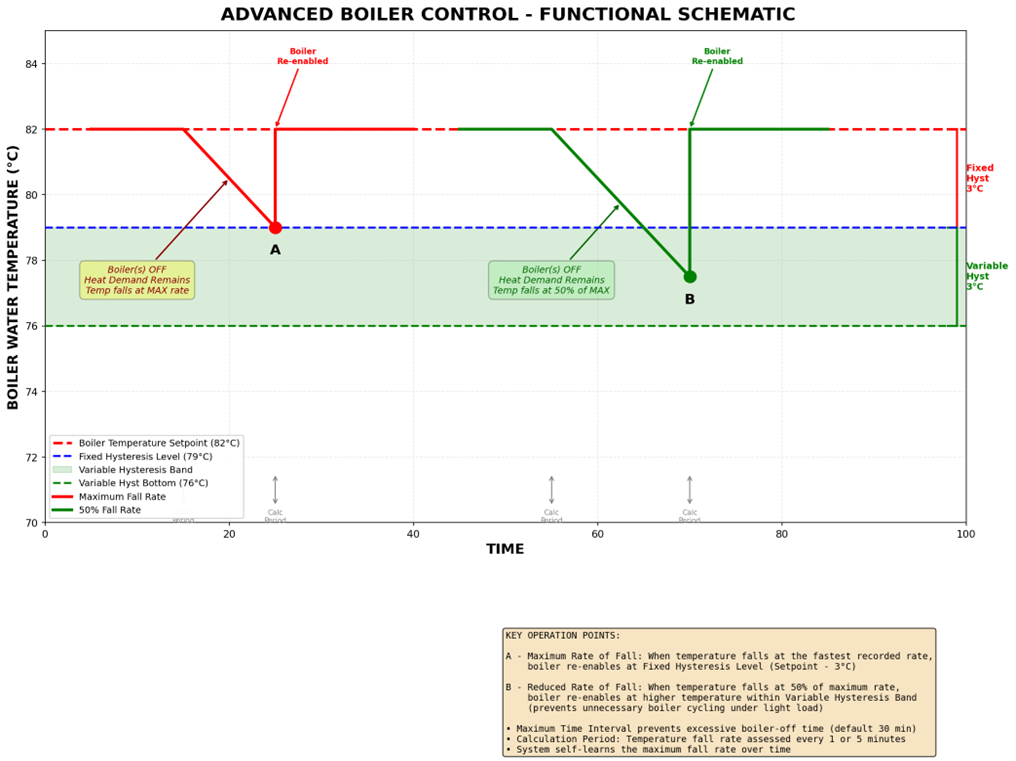
The following schematic illustrates how ABC operates under different load conditions. Study the two scenarios to understand how the system adapts:
Scenario Analysis
Scenario A - Maximum Load Condition
Situation: Cold weather, multiple heating zones demanding heat, temperature falling at maximum rate
-
Boiler reaches 82°C setpoint and shuts off
-
Temperature drops rapidly as building demands maximum heat
-
ABC recognizes this as maximum fall rate
-
Boiler restarts at Point A (79°C) - the Fixed Hysteresis Level
-
Boiler ramps back up to setpoint quickly to meet demand
Result: Minimal delay ensures heating needs are met during peak demand
Scenario B - Light Load Condition
Situation: Mild weather, only a few zones calling for heat, temperature falling at 50% of maximum rate
-
Boiler reaches 82°C setpoint and shuts off
-
Temperature drops more slowly than maximum (50% rate)
-
ABC calculates that current rate is 50% of the maximum it has seen
-
Boiler restarts at Point B (77.5°C) - midway in the Variable Hysteresis Band
10. Temperature allowed to drift lower before restart, preventing dry cycling
Result: Energy saved by avoiding unnecessary short-cycling while still maintaining comfort
Configuration & Setup
Input Parameters
|
No |
Parameter Name |
Type |
Description |
|
1 |
Enable Advanced Boiler Control |
Switch (Digital) |
Master switch to enable/disable ABC functionality |
|
2 |
Call for Heating |
Digital |
Signal indicating downstream heating loads need heat |
|
3 |
Boiler(s) Water Temperature |
Analogue |
Can be Flow or Return temperature sensor |
|
4 |
Boiler(s) Temperature Setpoint |
Knob (Analogue) |
Target temperature for boiler operation (e.g., 82°C) |
|
5 |
Boiler(s) Fixed Hyst Temp Level |
Knob (Analogue) |
Default: 3°C (Range: 1-10°C). Temperature drop from setpoint at which boiler restarts during maximum demand |
|
6 |
Boiler(s) Var Hyst Temp Band |
Knob (Analogue) |
Default: 3°C (Range: 1-10°C). Additional temperature band below Fixed Hyst for light load operation |
|
7 |
Boiler(s) Hyst Max Time Interval |
Knob (Analogue) |
Default: 30 min (Range: 5-60 min). Maximum time boiler can be held off once temp falls below Fixed Hyst Level |
|
8 |
Calculation Period Selection |
Switch |
OFF = 1 minute, ON = 5 minutes. Default: ON (5 min recommended for most applications) |
|
9 |
Reset Maximum Fall Rate |
Switch |
Default: OFF. Temporarily ON to reset learned maximum fall rate to zero (useful after system changes) |
Output Signals
|
No |
Output Name |
Type |
Description |
|
1 |
Boiler[s] Available via ABC |
Digital |
Signal to enable boiler(s) when ABC determines restart is required |
|
2 |
Max % Fall of Last 4 Periods |
Analogue |
Diagnostic output showing current fall rate as percentage of maximum (0-100%) |
Practical Implementation Guide
Initial Setup Checklist
-
Connect temperature sensor - Choose either flow or return temperature based on system design
-
Set boiler setpoint - Configure to match your system requirements (typically 70-85°C)
-
Configure Fixed Hysteresis - Start with 3°C default for most applications
-
Configure Variable Hysteresis - Start with 3°C default; can increase for more energy savings
-
Set maximum time interval - Default 30 minutes is suitable for most systems
-
Choose calculation period - 5 minutes recommended for typical commercial systems
-
Enable ABC - Turn on Enable Advanced Boiler Control switch
-
Monitor operation - Observe for 24-48 hours to ensure proper function
Tuning Recommendations
Fixed Hysteresis Level
-
Smaller values (1-2°C): Tighter temperature control, less energy savings potential, good for critical applications
-
Medium values (3-5°C): Balanced approach, recommended for most commercial applications
-
Larger values (6-10°C): Maximum energy savings, suitable for systems with good thermal mass and less critical temperature requirements
Variable Hysteresis Band
-
Smaller values (1-2°C): More conservative, less aggressive dry cycle prevention
-
Medium values (3-5°C): Standard setting for most applications
-
Larger values (6-10°C): Aggressive dry cycle prevention, maximum energy savings under light loads
Maximum Time Interval
This is a safety feature that prevents the boiler from being held off too long. Consider:
-
Shorter times (5-15 min): For systems where zones might struggle if boiler is off too long
-
Medium times (20-40 min): Standard for most systems with adequate thermal mass
-
Longer times (45-60 min): For systems with excellent thermal storage and distribution
System Integration
ABC can be used in several ways:
Standalone Operation
ABC can be the sole control strategy for your boiler system. The 'Boiler[s] Available via ABC' output directly controls the boiler enable signal.
Combined with Other Strategies
ABC works alongside other control blocks such as:
-
Lead-lag sequencing: ABC prevents dry cycling of all boilers in the sequence
-
Outside air reset: ABC adapts to varying setpoints automatically
-
Optimization routines: ABC can be disabled during warm-up periods if needed
Conditional Activation
The 'Enable Advanced Boiler Control' input allows ABC to be switched in or out as needed. For example, you might disable it during:
-
Early morning warm-up periods
-
Extreme cold weather events
-
System commissioning or testing
Troubleshooting & Optimization
Common Issues
Issue: Zones not reaching temperature during light loads
Symptoms: Some zones struggle to maintain setpoint during mild weather
Possible Causes & Solutions:
-
Variable Hysteresis Band may be too large - reduce from 3°C to 2°C or 1°C
-
Maximum Time Interval may be too long - reduce from 30 min to 20 min or less
-
Check that zones have adequate flow and properly functioning control valves
Issue: Still experiencing dry cycling
Symptoms: Boiler continues to short-cycle even with ABC enabled
Possible Causes & Solutions:
-
Fixed Hysteresis Level may be too small - increase from 3°C to 4°C or 5°C
-
Variable Hysteresis Band may be too small - increase from 3°C to 5°C or more
-
System may not have learned maximum fall rate yet - wait 24-48 hours of typical operation
-
Verify 'Max % Fall of Last 4 Periods' output to see current vs maximum rate
Issue: ABC not functioning at all
Symptoms: Boiler behavior unchanged after enabling ABC
Checklist:
-
Verify 'Enable Advanced Boiler Control' is ON
10. Check that 'Call for Heating' signal is present
11. Confirm temperature sensor is connected and reading accurately
12. Verify 'Boiler[s] Available via ABC' output is wired to boiler enable
13. Check that setpoint is properly configured
Monitoring & Diagnostics
Use the 'Max % Fall of Last 4 Periods' output to understand system behavior:
-
100%: Temperature falling at maximum recorded rate - boiler will restart at Fixed Hysteresis Level
-
75%: Moderate demand - boiler will restart at 75% through Variable Hysteresis Band
-
50%: Light demand - boiler will restart at 50% through Variable Hysteresis Band
-
25%: Very light demand - boiler will restart near bottom of Variable Hysteresis Band
-
0%: Temperature stable or rising - boiler will restart only at bottom of Variable Hysteresis Band
Seasonal Adjustments
You may want to adjust ABC parameters seasonally:
Winter (Peak Heating Season)
-
Consider reducing Variable Hysteresis Band to 2°C for tighter control
-
May reduce Maximum Time Interval to 20 minutes
-
Reset maximum fall rate at start of winter to capture new conditions
Spring/Fall (Shoulder Seasons)
-
Standard settings (3°C / 3°C) typically work well
-
This is when ABC provides maximum benefit
-
Monitor zone satisfaction to ensure adequate heating
Summer (Minimal Operation)
-
Can increase Variable Hysteresis Band to 5°C for maximum savings
-
Consider disabling ABC if boiler is only used for DHW
-
Reset maximum fall rate at end of summer before heating season begins
Technical Reference
Operating Sequence Detailed
Step 1: Normal Operation
Boiler operates normally to maintain setpoint. ABC is passive during this phase, not affecting boiler operation.
Step 2: Setpoint Achievement & Boiler Disable
When boiler water temperature reaches or exceeds setpoint, the primary control disables the boiler. ABC begins monitoring temperature fall.
Step 3: Temperature Fall Rate Calculation
At each calculation period (1 or 5 minutes), ABC calculates the rate of temperature decrease. This calculation begins only after the first full calculation period has elapsed from boiler shutdown.
Step 4: Maximum Rate Tracking
The system maintains a rolling record of the four most recent fall rate calculations and identifies the maximum value. If a new calculation exceeds the current maximum, it becomes the new reference.
Step 5: Re-enable Temperature Determination
ABC calculates the temperature at which the boiler should restart based on:
-
Current fall rate as percentage of maximum
-
Fixed Hysteresis Level setting
-
Variable Hysteresis Band setting
Formula: Re-enable Temp = Setpoint - Fixed Hyst - (Var Hyst × (1 - Current%/100))
Step 6: Time Limit Check
If temperature has fallen below Fixed Hysteresis Level and the Maximum Time Interval has elapsed, the boiler is immediately re-enabled regardless of current temperature, ensuring zones don't become too cold.
Step 7: Boiler Re-enable
When either the calculated re-enable temperature is reached or the time limit expires, ABC sets the 'Boiler[s] Available via ABC' output to enable the boiler.
Step 8: Return to Normal Operation
Boiler operates to restore setpoint temperature. Once setpoint is achieved, the cycle repeats from Step 2.
Important Considerations
System Sizing & Thermal Mass
ABC works best in systems with adequate thermal mass in the distribution system (piping, radiators, etc.). Systems with very low thermal mass may see temperature drop too quickly for ABC to provide significant benefit.
Temperature Sensor Selection
Flow Temperature: Provides faster response to changes, recommended for most applications
Return Temperature: Provides more stable signal, may be preferred in some distribution systems
Multiple Boiler Applications
When using ABC with multiple boilers, the temperature measurement should represent the common header temperature. ABC will control all boilers together as a single system.
Reset Strategy Interaction
If using outdoor air reset or other setpoint modulation strategies, ABC automatically adapts to the changing setpoint. The hysteresis bands are always calculated relative to the current active setpoint.
Calculation Period Selection Guidance
1-Minute Calculation Period:
-
Advantages: Faster response, can detect rapid load changes quickly
-
Disadvantages: More sensitive to measurement noise, may react to temporary fluctuations
-
Best for: Small systems, low thermal mass, rapid load changes
5-Minute Calculation Period (Default):
-
Advantages: More stable calculation, filters out short-term fluctuations
-
Disadvantages: Slower to detect changing conditions
-
Best for: Most commercial systems, good thermal mass, stable operation
Best Practices & Tips
Commissioning Best Practices
14. Start conservative: Begin with smaller hysteresis values and increase if dry cycling persists
15. Allow learning time: Give the system 24-48 hours to learn your building's characteristics
16. Monitor zone satisfaction: Check that all zones maintain temperature during initial operation
17. Document settings: Record final configuration parameters for future reference
18. Educate operators: Ensure building staff understand how ABC works and when to adjust it
Energy Savings Tips
-
Use ABC during shoulder seasons for maximum savings when loads are lightest
-
Combine with outdoor air reset to optimize both setpoint and cycling
-
Ensure distribution system is properly balanced so all zones receive adequate flow
-
Consider slightly wider hysteresis bands during mild weather for increased savings
-
Monitor and trend boiler short-cycle events to quantify improvements
Maintenance & Periodic Review
Monthly:
-
Review 'Max % Fall of Last 4 Periods' trending data
-
Check for any zone temperature complaints
-
Verify temperature sensors are accurate
Seasonally:
-
Review and adjust hysteresis settings as needed
-
Consider resetting maximum fall rate at season changes
-
Document any changes made and reasons
Annually:
-
Complete system review including all sensors and actuators
-
Calibrate temperature sensors if needed
-
Review energy data to quantify savings
-
Update documentation with any system changes
Appendix
Glossary of Terms
Advanced Boiler Control (ABC): An intelligent control strategy that prevents dry cycling by monitoring temperature fall rates and adaptively delaying boiler restart.
Dry Cycling: Undesirable condition where a boiler turns on and off repeatedly in short intervals under light load conditions, wasting energy and reducing equipment life.
Fixed Hysteresis Level: The temperature drop below setpoint at which the boiler restarts when experiencing maximum heating demand (fastest temperature fall rate).
Variable Hysteresis Band: An additional temperature band below the Fixed Hysteresis Level. The boiler restart temperature varies within this band based on current demand relative to maximum demand.
Temperature Fall Rate: The rate at which boiler water temperature decreases when the boiler is off but heating is still demanded, measured in degrees per minute.
Maximum Fall Rate: The fastest temperature decrease observed over the four most recent calculation periods. This represents peak heating demand conditions.
Calculation Period: The time interval (1 or 5 minutes) over which temperature fall rate is measured and calculated.
Maximum Time Interval: A safety limit that specifies the longest time the boiler can be held off once temperature falls below the Fixed Hysteresis Level, ensuring zones don't become too cold.
Self-Learning: The capability of ABC to automatically discover and remember the maximum temperature fall rate characteristic of a specific building's heating system.
9.2 Quick Reference Card
|
Parameter |
Typical Settings |
|
Fixed Hysteresis Level |
3°C (Range: 1-10°C) |
|
Variable Hysteresis Band |
3°C (Range: 1-10°C) |
|
Max Time Interval |
30 minutes (Range: 5-60 min) |
|
Calculation Period |
5 minutes (1 minute for small/fast systems) |
|
Learning Period |
24-48 hours of typical operation |
Example Calculation
-
Setpoint: 82°C
-
Fixed Hysteresis Level: 3°C
-
Variable Hysteresis Band: 3°C
-
Maximum recorded fall rate: 0.6°C/min
-
Current fall rate: 0.3°C/min (50% of maximum)
Calculations:
-
Fixed Hysteresis Temperature: 82°C - 3°C = 79°C
-
Variable Hysteresis Bottom: 79°C - 3°C = 76°C
-
Current Rate as Percentage: 0.3 / 0.6 = 50%
-
Re-enable Temperature:
79°C - (3°C × (1 - 0.50)) = 79°C - 1.5°C = 77.5°C
Result: Under these light load conditions (50% of max demand), the boiler will restart at 77.5°C instead of waiting until 76°C. This prevents excessive temperature drift while still avoiding dry cycling.
If you need more help:
Then why not contact our sales or support team.

sales@forestrock.co.uk or support@forestrock.co.uk
Other Resources & Customer Survey:
💬 Don't miss out! Follow the Forest Rock News channel on WhatsApp Click Here!
💬 We’d also love your feedback! Please take a moment to complete our quick Customer Survey
It only takes a minute and helps us serve you better!

IoT Devices for BMS, Automation & Smart Connectivity | Forest Rock