

Understanding BACnet Broadcast Management Devices (BBMD) in Niagara 4
Introduction
If you're new to BACnet networking and Niagara 4, understanding the BACnet Broadcast Management Device (BBMD) is essential for building robust, multi-subnet building automation systems. This guide will walk you through what BBMDs are, why they're needed, and how to configure them in Niagara 4.
What is a BBMD?
A BACnet Broadcast Management Device (BBMD) is a special type of BACnet device that manages broadcast messages across different IP subnets in a BACnet/IP network.
Can a Niagara JACE 9000 Become a BBMD?
Yes, absolutely! The Niagara JACE 9000 controller can function as a full BBMD. In fact, any Niagara 4 device (JACE 8000, JACE 9000, or even a Niagara Supervisor running on a server) can act as a BBMD. This is one of the powerful features of the Niagara framework.
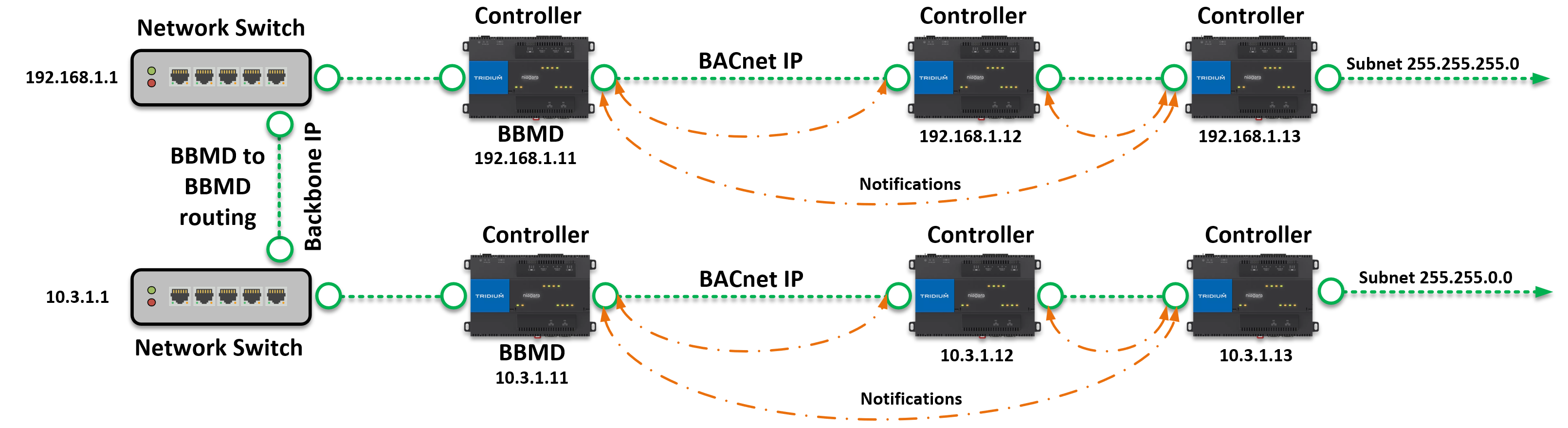
The Problem BBMDs Solve
In a typical IP network:
-
Broadcast messages only reach devices on the same subnet
-
IP routers typically block broadcast traffic between subnets
-
Without BBMDs, BACnet devices on different subnets cannot discover each other or communicate properly
Why Use a JACE 9000 as a BBMD?
Using a JACE 9000 as a BBMD offers several advantages:
-
Dual Purpose Device: The JACE 9000 serves both as a building controller AND as network infrastructure
-
Controls local I/O, equipment, and sequences: The JACE continues to perform its primary function—controlling HVAC equipment, lighting, access control, or other building systems
-
Simultaneously manages BACnet broadcasts across subnets: While controlling equipment, the same JACE also handles BBMD duties with minimal performance impact
-
Eliminates the need for dedicated BBMD hardware: You don't need to purchase separate routers or specialized BACnet devices just for broadcast management
-
Real-World Example: Multi-Building Campus
Imagine a university campus with three buildings:
Building A - Science Hall
-
JACE 9000 on subnet 192.168.1.0/24
-
Controls 15 VAV boxes, 3 AHUs, lighting
-
Also configured as BBMD for this subnet
Building B - Administration
-
JACE 9000 on subnet 192.168.2.0/24
-
Controls chillers, boilers, central plant
-
Also configured as BBMD for this subnet
Building C - Library
-
JACE 9000 on subnet 192.168.3.0/24
-
Controls fan coils, pumps, occupancy-based lighting
-
Also configured as BBMD for this subnet
The Network Setup:
-
Each JACE is connected to the campus IP network through a managed switch in its mechanical room
-
All three JACEs have their BDT configured with the other two JACE IP addresses
-
A Niagara Supervisor in the facilities office can now discover and communicate with ALL devices across all three buildings
What Each JACE Does:
-
Primary Job: Controls local equipment (this is why you bought it)
-
Secondary Job: Acts as BBMD, forwarding Who-Is/I-Am messages between buildings
-
Result: The supervisor can discover a VAV controller in Building A, a chiller in Building B, and a fan coil in Building C—all without any additional BBMD hardware
The Beauty of This Approach:
-
If Building D is added later, you just add its JACE to everyone's BDT
-
Each JACE is already monitored and maintained by your team
-
Network traffic is efficiently managed without bottlenecks
-
Total additional cost for BBMD functionality: $0
In a typical IP network:
-
Broadcast messages only reach devices on the same subnet
-
IP routers typically block broadcast traffic between subnets
-
Without BBMDs, BACnet devices on different subnets cannot discover each other or communicate properly
How BBMDs Work
BBMDs solve this problem by:
-
Monitoring broadcast messages on their local subnet
-
Converting broadcast messages into directed (unicast) messages
-
Forwarding these messages to other BBMDs on different subnets
-
Retransmitting the broadcasts on each remote subnet
This allows critical BACnet functions like device discovery (Who-Is/I-Am messages) to work across multiple subnets.
Key BBMD Concepts
Broadcast Distribution Table (BDT)
-
Each BBMD maintains a Broadcast Distribution Table (BDT)
-
The BDT contains the IP addresses of all other BBMDs in the network
-
Typically, all BBMDs have the same BDT (containing all BBMD addresses)
-
This ensures broadcasts reach every subnet in your BACnet network
Foreign Device Registration (FDR)
BBMDs also support Foreign Device registration:
-
A Foreign Device is a BACnet device located on a subnet that doesn't have a BBMD
-
Foreign devices can register with a BBMD on another subnet
-
Once registered, the foreign device receives broadcasts and can communicate with all network devices
-
The BBMD maintains a Foreign Device Table (FDT) of registered devices
When Do You Need BBMDs?
You NEED BBMDs when:
-
Your BACnet/IP network spans multiple IP subnets (e.g., 192.168.1.0/24 and 192.168.2.0/24)
-
Devices need to discover each other across subnet boundaries
-
You have a large campus with buildings on different network segments
You DON'T need BBMDs when:
-
All BACnet devices are on the same subnet (e.g., all on 192.168.1.0/24)
-
You're using different UDP ports to segment networks (Niagara can route between these)
-
You have a small, single-subnet installation
Common BBMD Network Topologies
Topology 1: BBMD on Each Subnet
Subnet A (192.168.1.0/24)          Subnet B (192.168.2.0/24)
    |                                      |
[BBMD A] --------IP Router--------- [BBMD B]
    |                                      |
[Devices]                             [Devices]
-
Most common configuration
-
One BBMD per subnet
-
All BBMDs know about each other via BDT
Topology 2: Foreign Device Registration
Subnet A (192.168.1.0/24)          Subnet B (192.168.2.0/24)
    |                                      |
[BBMD A] --------IP Router--------- [No BBMD]
    |                                      |
[Devices]                          [Foreign Device]
                                   (registers with BBMD A)
-
Used when one subnet has few devices
-
Foreign device must actively register with BBMD
-
Reduces number of BBMDs needed
Topology 3: Niagara Supervisor as BBMD
                [Niagara Supervisor]
                   (Acts as BBMD)
                        |
         --------------------------------
         |              |               |
    Subnet A       Subnet B         Subnet C
    [Devices]      [Devices]        [Devices]
-
Niagara 4 can function as a BBMD
-
Centralised management
-
Common in supervisory applications
Configuring BBMD in Niagara 4
Prerequisites
Before configuring BBMD functionality, ensure:
-
Modules Installed: Install the required BACnet modules in Niagara 4
-
Navigate to Platform Administration
-
Install:
bacnet,bacnetNetwork,bacnetDrivermodules -
Restart the station after installation
-
-
Basic BACnet Configuration: Complete basic BACnet setup
-
Configure your BACnet Device ID
-
Set up the IP Port
-
Enable the Ethernet adapter
-
Step 1: Configure the BACnet IP Port
-
Navigate to:
Config > Drivers > BacnetNetwork > BacnetComm > Network > IpPort -
Configure the following properties:
-
Network Number: Assign a unique network number (e.g., 1, 2, 3)
-
Link > Adapter: Select your Ethernet adapter from the dropdown
-
Udp Port: Use default
0xBAC0(47808 decimal) -
Enabled: Set to
true
-
Step 2: Enable BBMD Mode
-
In the IpPort component, locate the BBMD settings
-
Set BBMD Enabled to
true -
Configure Maximum Foreign Devices: Set the maximum number of foreign devices that can register (e.g., 10, 20)
Step 3: Configure the Broadcast Distribution Table (BDT)
-
In the IpPort component, find the BDT (Broadcast Distribution Table)
-
Add entries for all other BBMDs in your network:
-
Click Add or right-click to add a new BDT entry
-
Enter the IP address of each remote BBMD
-
Format:
192.168.1.100or192.168.1.100:47808
-
-
Example BDT for a three-subnet network:
   192.168.1.100:47808  (BBMD on Subnet A)
   192.168.2.100:47808  (BBMD on Subnet B)
   192.168.3.100:47808  (BBMD on Subnet C)
Step 4: Configure as Foreign Device (Alternative)
If your Niagara station needs to act as a Foreign Device instead of a BBMD:
-
In the IpPort component, locate foreign device settings
-
Enable Foreign Device mode
-
Configure:
-
BBMD Address: IP address of the BBMD to register with
-
BBMD Port: Usually
0xBAC0(47808) -
Registration TTL: Time-to-live in seconds (e.g., 30-60 seconds)
-
Testing Your BBMD Configuration
Verify BBMD Operation
-
Check Application Director:
-
Open the Application Director in Niagara
-
Look for any BBMD-related errors or warnings
-
Verify routing is enabled (if it keeps disabling, check the App Director for reasons)
-
-
Test Device Discovery:
-
Navigate to:
Config > Drivers > BacnetNetwork -
Open AX Bacnet Device Manager
-
Click Discover
-
Select networks to search
-
Verify devices appear from multiple subnets
-
-
Monitor Network Traffic:
-
Use Wireshark or another packet analyzer
-
Filter for UDP port 47808 (
udp.port == 47808) -
Look for:
-
Who-Is broadcasts
-
I-Am responses
-
BBMD forwarding packets
-
-
Common Issues and Troubleshooting
Issue: Devices not discovered across subnets
-
Check: Verify BDT contains correct IP addresses of all BBMDs
-
Check: Ensure IP routing is working between subnets (ping test)
-
Check: Confirm firewall rules allow UDP port 47808
Issue: Foreign device not registering
-
Check: Verify BBMD address is correct in foreign device configuration
-
Check: Ensure "Maximum Foreign Devices" on BBMD is not set too low
-
Check: Registration TTL is reasonable (30-60 seconds)
Issue: BBMD keeps disabling
-
Check: Application Director for specific error messages
-
Check: Network number conflicts
-
Check: Adapter selection is correct
Best Practices
Network Design
-
One BBMD per subnet: Most reliable configuration
-
Consistent BDT entries: All BBMDs should have the same BDT
-
Document your network numbers: Keep a record of which network number corresponds to which subnet
Security Considerations
-
Never expose BACnet directly to the internet
-
Use VPNs for remote access, not port forwarding
-
Implement firewall rules to restrict BACnet traffic to trusted networks
-
Consider BACnet Secure Connect (BACnet/SC) for sensitive applications
Performance
-
Limit broadcast traffic: Use device discovery sparingly in production
-
Use unicast where possible: Once devices are known, use direct addressing
-
Monitor network busy levels: Keep below 80% busy time on BACnet networks
Quick Reference: Niagara 4 BBMD Configuration
|
Setting |
Location |
Typical Value |
|---|---|---|
|
Network Number |
IpPort > Network Number |
1, 2, 3, etc. (unique per port) |
|
UDP Port |
IpPort > Udp Port |
0xBAC0 (47808) |
|
Adapter |
IpPort > Link > Adapter |
Select your Ethernet adapter |
|
BBMD Enabled |
IpPort > BBMD Enabled |
true (if acting as BBMD) |
|
Max Foreign Devices |
IpPort > Maximum Foreign Devices |
10-20 typical |
|
BDT Entries |
IpPort > BDT |
IP addresses of all other BBMDs |
Conclusion
BBMDs are essential for building large-scale BACnet/IP networks that span multiple subnets. Niagara 4 provides full support for BBMD functionality, allowing your supervisors and controllers to communicate seamlessly across complex network topologies.
Key takeaways:
-
BBMDs enable BACnet broadcasts across IP subnets
-
Each BBMD maintains a BDT listing all other BBMDs
-
Foreign devices can register with BBMDs to participate in the network
-
Niagara 4 can act as both a BBMD and a Foreign Device
-
Proper configuration and testing ensure reliable multi-subnet communication
Additional Resources
-
Niagara 4 BACnet Guide (Tridium documentation)
-
BACnet Standard ASHRAE-135 (for in-depth protocol details)
-
BACnet International (http://www.bacnetinternational.org )
-
Niagara Community forums for troubleshooting and best practices
This guide is designed for engineers and technicians new to BACnet networking and Niagara 4. For advanced topics like BACnet routing, network segmentation strategies, or BACnet/SC, consult additional resources or experienced BACnet professionals.
If you need more help:
Then why not contact our sales or support team.
sales@forestrock.co.uk or support@forestrock.co.uk
Other Resources & Customer Survey:
💬 Don't miss out! Follow the Forest Rock News channel on WhatsApp Click Here!
💬 We’d also love your feedback! Please take a moment to complete our quick Customer Survey
It only takes a minute and helps us serve you better!

IoT Devices for BMS, Automation & Smart Connectivity | Forest Rock