

License-Free & Hassle-Free
Video Tutorial: Milesight BACnet Driver for Niagara – License-Free & Hassle-Free
This knowledge base is compiled from the Milesight IoT video series. For the latest videos and updates, visit the Milesight channel on YouTube.
NOTE:
If you want to watch the video while following along with the text notes, then right click and open the video in a new split screen window and the video should appear on the right of the notes so that you can follow along.
Overview
The Milesight BACnet Driver is a revolutionary license-free tool that provides seamless integration of Milesight LoRaWAN gateways and sensors with Niagara BMS platforms. This driver eliminates the complexity and cost traditionally associated with IoT sensor integration, enabling plug-and-configure deployment without coding or middleware.
Download The Driver Here: Forest Rock Downloads Site
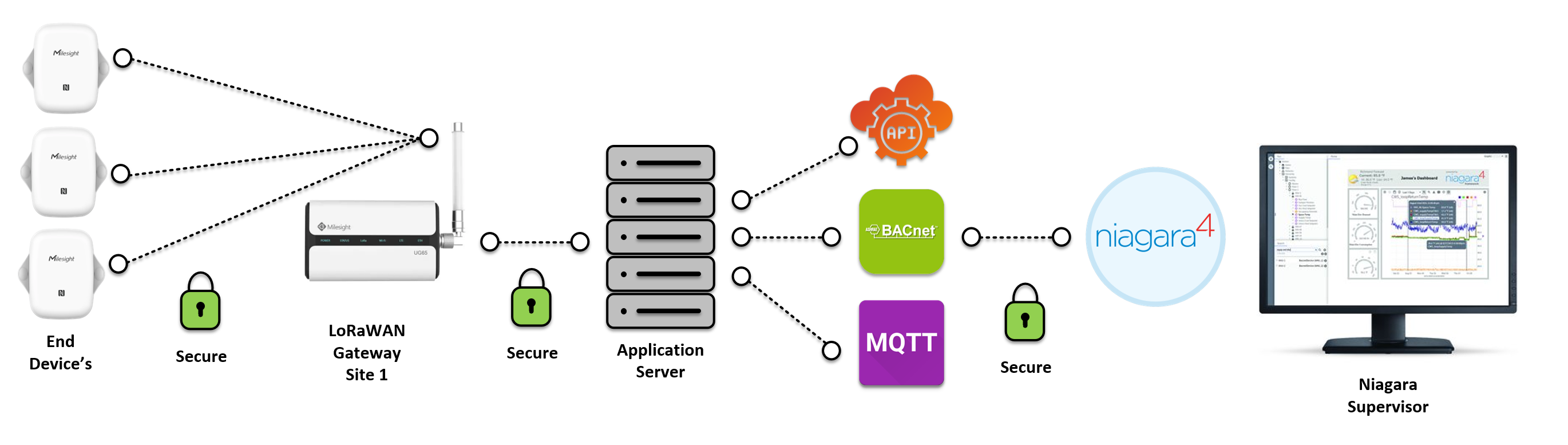
The Problem: Traditional LoRaWAN Integration
Common Challenges
Cost Issues:
-
Multiple licensing fees
-
Expensive integration tools
-
Ongoing subscription costs
Technical Complexity:
-
Requires deep technical expertise
-
Custom coding often needed
-
Complex middleware configurations
-
Multiple integration tools required
Deployment Barriers:
-
Time-consuming setup process
-
Difficult to scale
-
High maintenance overhead
-
Vendor lock-in
Result: Many buildings hesitate to adopt LoRaWAN sensors despite their benefits.
The Solution: Milesight BACnet Driver
Revolutionary Approach
Zero Cost:
-
✅ Completely license-free
-
✅ No subscription fees
-
✅ No hidden costs
-
✅ Full functionality at zero extra charge
Simple Integration:
-
✅ No coding required
-
✅ No middleware needed
-
✅ Plug-and-configure approach
-
✅ Few-click configuration
Seamless Operation:
-
✅ Direct BACnet integration
-
✅ Native Niagara support
-
✅ Intuitive interface
-
✅ Quick deployment
Key Features
1. License-Free Operation
Complete Functionality:
-
Full driver capabilities
-
Unlimited devices
-
No trial period or limitations
-
No payment required ever
Business Benefits:
-
Reduce project costs
-
Eliminate licensing overhead
-
Predictable budgeting
-
Lower total cost of ownership
2. No Coding Required
User-Friendly Configuration:
-
Graphical interface
-
Point-and-click setup
-
Pre-configured templates
-
Automatic device discovery
Who Can Use It:
-
System integrators
-
Building managers
-
Technicians
-
Anyone with basic Niagara knowledge
3. No Middleware Needed
Direct Integration:
-
Native BACnet communication
-
Direct gateway connection
-
Eliminates complexity
-
Reduces failure points
Architecture:
Traditional Approach:
Sensors → Gateway → Middleware → Protocol Converter → BMS

Milesight Approach:
Sensors → Gateway → BACnet Driver → Niagara BMS
4. Scalable Integration
Grow As You Need:
-
Start small, expand easily
-
Add devices with minimal effort
-
No reconfiguration required
-
System grows with your needs
Scalability Benefits:
-
Future-proof investment
-
Easy building expansion
-
Flexible deployment
-
No system limitations
5. Built-In Security
Enterprise-Grade Protection:
-
Robust encryption
-
Authentication protocols
-
Secure data transmission
-
Protected API access
Security Features:
-
TLS/SSL encryption
-
Token-based authentication
-
Secure API endpoints
-
Data integrity verification
6. Real-Time Insights
Live Building Data:
-
Real-time sensor readings
-
Performance monitoring
-
Instant alerts
-
Operational visibility
Benefits:
-
Optimize building operations
-
Reduce maintenance costs
-
Improve energy efficiency
-
Enhance occupant comfort
What is LoRaWAN?
Understanding the Technology
LoRaWAN (Long Range Wide Area Network):
-
Wireless communication protocol
-
Long-range transmission (up to 10+ km)
-
Low power consumption
-
Ideal for IoT sensors
Why LoRaWAN for Buildings:
-
Battery-powered sensors (years of operation)
-
No wiring required
-
Easy retrofitting
-
Cost-effective deployment
-
Penetrates walls and floors effectively
Common Building Applications:
-
Temperature and humidity monitoring
-
Air quality sensors (CO2, VOC, PM2.5)
-
Occupancy detection
-
Energy monitoring
-
Water leak detection
-
Door/window status
-
Asset tracking
Milesight LoRaWAN Gateway
What is the Gateway?
Central Hub:
-
Receives data from LoRaWAN sensors
-
Converts to BACnet protocol
-
Connects to building LAN
-
Manages sensor network
Gateway Capabilities:
-
Multiple sensor support
-
Long-range coverage
-
Robust connectivity
-
Easy configuration
Getting Started: 4 Simple Steps
Step 1: Initial Setup
Hardware Setup
1. Power On the Gateway
-
Connect gateway to power supply
-
Wait for gateway to boot up
-
Verify LED indicators
2. Connect to LAN
-
Connect Ethernet cable to gateway
-
Connect other end to building network
-
Ensure network connectivity
-
Note gateway IP address
Software Setup
3. Download Driver Package
-
Visit Milesight website or Niagara station
-
Download Milesight BACnet Driver package
-
Locate driver JAR file
4. Load Driver to Niagara Workbench
-
Open Niagara Workbench
-
Navigate to Software Manager
-
Install driver package
-
Restart Niagara if required
-
Verify driver appears in palette
Result: Driver ready for configuration
Step 2: Create Network and Add Gateway
You have two configuration options:
Option A: Create Milesight Network (Recommended)
Purpose: Dedicated network for Milesight devices
Steps:
1. Create Milesight Network
-
Navigate to station Drivers folder
-
Right-click → New
-
Select Milesight Network from palette
-
Name the network (e.g., "MilesightLoRaWAN")
2. Add Gateway to Network
-
Expand Milesight Network
-
Right-click → New
-
Select Milesight LoRaWAN Gateway
-
Configure gateway properties
3. Configure Network Settings
-
Gateway IP Address: Enter gateway LAN IP
-
Port: Default or custom port
-
Polling Interval: Set update frequency
4. Configure API Settings
-
API Endpoint: Gateway API URL
-
Authentication: Enter credentials
-
Security Token: If required
-
SSL/TLS: Enable if supported
Benefits of Milesight Network:
-
Organized device structure
-
Centralized management
-
Clear hierarchy
-
Easy troubleshooting
Option B: Connect to Existing BACnet Network
Purpose: Integrate with existing BACnet infrastructure
Steps:
1. Locate BACnet Network
-
Navigate to existing BACnet network in station
-
Open BACnet device tree
2. Discover or Add Gateway
-
Use BACnet device discovery
-
Or manually add gateway as BACnet device
-
Enter BACnet device instance number
3. Configure Connection
-
Set BACnet communication parameters
-
Configure IP address and port
-
Enable BACnet services
4. Verify Connection
-
Check device status
-
Test communication
-
Confirm point discovery
Benefits of BACnet Integration:
-
Uses existing infrastructure
-
Unified BACnet approach
-
Familiar configuration
-
Standard BACnet tools available
Step 3: Add Devices and Configure Points
Understanding Milesight Node Devices
Node Devices:
-
Individual LoRaWAN sensors
-
Communicate through gateway
-
Provide sensor data
-
Configurable parameters
Common Device Types:
-
Temperature/Humidity sensors
-
Air quality monitors (CO2, VOC, PM2.5)
-
Occupancy sensors
-
Light sensors
-
Water leak detectors
-
Door/window contacts
-
Energy meters
Add Node Devices
1. Device Discovery
-
Navigate to gateway in station
-
Look for device discovery option
-
Run discovery process
-
Wait for sensors to appear
Automatic Discovery:
-
Gateway automatically detects sensors
-
Lists available devices
-
Shows device IDs and types
2. Manual Addition (if needed)
-
Right-click on gateway
-
Select Add Node Device
-
Choose device type from list
-
Enter device parameters:
-
Device ID: LoRaWAN device EUI
-
Device Name: Descriptive name
-
Location: Physical location
-
3. Verify Device Connection
-
Check device status (Online/Offline)
-
Verify communication
-
Confirm data updates
Configure BACnet Points
1. View Available Points
-
Expand node device
-
View automatically discovered points
-
Each sensor type provides different points
Example Points by Device Type:
Temperature/Humidity Sensor:
-
Temperature (Analog Input)
-
Humidity (Analog Input)
-
Battery Level (Analog Input)
-
RSSI (Signal Strength)
Air Quality Sensor:
-
CO2 (Analog Input)
-
VOC (Analog Input)
-
PM2.5 (Analog Input)
-
Temperature (Analog Input)
-
Humidity (Analog Input)
Occupancy Sensor:
-
Occupancy Status (Binary Input)
-
PIR Trigger Count (Analog Input)
-
Battery Level (Analog Input)
2. Save BACnet Points
-
Select points to save
-
Click Save or Import Points
-
Points added to station database
-
Ready for use in applications
3. Configure Point Properties
-
Set units (°F, °C, ppm, etc.)
-
Configure facets (min, max, precision)
-
Set up alarms/limits
-
Add historical extensions if needed
4. Test Point Updates
-
Monitor live values
-
Verify data updating
-
Check update frequency
-
Confirm accuracy
Step 4: Complete Integration and Create Applications
Manage Device Data
Real-Time Monitoring:
-
View live sensor data
-
Monitor device status
-
Track battery levels
-
Check signal strength
Data Management:
-
Enable history collection
-
Configure data logging
-
Set up trending
-
Export data as needed
Create Applications in Niagara
Common Building Applications:
1. Air Quality Monitoring
-
Monitor CO2, VOC, PM2.5 levels
-
Display on dashboards
-
Alert on poor air quality
-
Control ventilation based on readings
2. Energy Management
-
Track energy consumption
-
Analyze usage patterns
-
Identify optimization opportunities
-
Reduce operational costs
3. Occupancy-Based Control
-
HVAC control based on occupancy
-
Lighting automation
-
Space utilization analytics
-
Comfort optimization
4. Temperature Monitoring
-
Zone temperature tracking
-
Setpoint management
-
Temperature-based control
-
Historical trending
5. Equipment Monitoring
-
Track equipment status
-
Monitor performance
-
Predictive maintenance alerts
-
Reduce downtime
6. Environmental Monitoring
-
Indoor air quality
-
Comfort parameters
-
Compliance monitoring
-
Health and safety
Building PX Graphics
Create Visualizations:
Dashboard Components:
-
Real-time value displays
-
Trend charts
-
Alarm summaries
-
Device status indicators
Floor Plan Graphics:
-
Sensor location overlay
-
Color-coded status
-
Click-through to details
-
Zone-based views
Trend Views:
-
Historical data charts
-
Multi-point comparisons
-
Time-based analysis
-
Export capabilities
Automation and Control
Logic Programming:
-
Use sensor data in programs
-
Create control sequences
-
Set up alarms
-
Build automation rules
Example Automation:
If CO2 > 1000 ppm:
  → Increase ventilation
  → Send alert
  → Log event
Integration Architecture
Network Topology
Building Network (LAN)
│
├── Niagara Station
│   └── Milesight BACnet Driver
│       └── Milesight Network
│           └── LoRaWAN Gateway (BACnet Device)
│               ├── Node Device 1 (Temp/Humidity)
│               │   ├── Temperature Point
│               │   └── Humidity Point
│               ├── Node Device 2 (CO2)
│               │   └── CO2 Level Point
│               └── Node Device 3 (Occupancy)
│                   └── Occupancy Status Point
│
└── Wireless LoRaWAN Network
    ├── Sensor 1 (LoRaWAN)
    ├── Sensor 2 (LoRaWAN)
    └── Sensor 3 (LoRaWAN)
Data Flow
1. Sensor collects data
   ↓
2. Sensor transmits via LoRaWAN
   ↓
3. Gateway receives LoRaWAN message
   ↓
4. Gateway converts to BACnet
   ↓
5. Niagara reads BACnet points
   ↓
6. Data available in station
   ↓
7. Applications use sensor data
Supported Devices
Milesight LoRaWAN Sensors
Environmental Sensors:
-
AM series (Air Quality)
-
EM series (Energy Meters)
-
VS series (Vision AI)
-
WS series (Water/Soil)
Building Sensors:
-
Door/Window contacts
-
Occupancy sensors
-
Leak detection
-
Asset trackers
Industrial Sensors:
-
Temperature/Humidity
-
Pressure sensors
-
Level sensors
-
Current/Voltage meters
Check with Milesight:
-
Latest device support
-
Firmware requirements
-
Compatibility matrix
Configuration Best Practices
Network Planning
Before Deployment:
-
Plan sensor locations
-
Consider coverage areas
-
Identify gateway placement
-
Map network topology
Gateway Placement:
-
Central location for coverage
-
Access to power and network
-
Consider building materials
-
Test coverage before final placement
Device Naming
Use Descriptive Names:
Good:
- "Level3_Conference_CO2"
- "Lobby_TempHumidity_01"
- "Server_Room_Leak_Detector"

Avoid:
- "Sensor1"
- "Device_ABC"
- "TH_Sensor"
Benefits:
-
Easy identification
-
Clear location
-
Simplified troubleshooting
-
Better reporting
Point Configuration
Set Appropriate Units:
-
Temperature: °F or °C
-
Humidity: %RH
-
CO2: ppm
-
PM2.5: μg/m³
Configure Facets:
-
Min/Max ranges
-
Precision (decimal places)
-
Engineering units
-
Display formats
Enable History:
-
Critical points
-
Trend analysis
-
Compliance reporting
-
Performance monitoring
Security Configuration
Gateway Security:
-
Change default passwords
-
Use strong API credentials
-
Enable HTTPS/TLS if available
-
Restrict network access
Niagara Security:
-
User authentication
-
Role-based access
-
Encrypt communications
-
Regular security audits
Troubleshooting
Gateway Not Communicating
Problem: Cannot connect to gateway
Possible Causes:
-
Network connectivity issues
-
Incorrect IP address
-
Firewall blocking
-
Gateway offline
Solutions:
-
Verify network connection
-
Ping gateway IP address
-
Check firewall rules
-
Restart gateway
-
Verify power supply
Sensors Not Appearing
Problem: Node devices not discovered
Possible Causes:
-
Sensors not registered on gateway
-
LoRaWAN coverage issues
-
Sensor battery dead
-
Wrong frequency band
Solutions:
-
Register sensors with gateway first
-
Check sensor battery level
-
Move sensor closer to gateway
-
Verify frequency settings match
-
Check sensor LED indicators
Points Not Updating
Problem: Data values not changing
Possible Causes:
-
Polling disabled
-
Sensor in sleep mode
-
Communication lost
-
Driver configuration error
Solutions:
-
Enable polling on driver
-
Wait for sensor wake cycle
-
Check signal strength (RSSI)
-
Verify driver settings
-
Restart driver
Poor Signal Strength
Problem: Low RSSI values, dropped messages
Possible Causes:
-
Distance too great
-
Physical obstructions
-
Interference
-
Gateway antenna issues
Solutions:
-
Add additional gateways
-
Relocate sensors
-
Check for interference sources
-
Verify antenna connections
-
Consider repeaters if needed
Benefits Summary
Cost Savings
Zero Licensing:
-
No driver license fees
-
No per-device fees
-
No subscription costs
-
Unlimited devices
Reduced Labor:
-
Faster deployment
-
Less technical expertise needed
-
Simplified maintenance
-
Quick troubleshooting
Lower Infrastructure:
-
No wiring required
-
Battery-powered sensors
-
Easy retrofits
-
Flexible placement
Operational Benefits
Real-Time Intelligence:
-
Live building data
-
Instant insights
-
Proactive management
-
Data-driven decisions
Improved Efficiency:
-
Optimized HVAC
-
Reduced energy consumption
-
Better space utilization
-
Enhanced comfort
Simplified Management:
-
Unified platform
-
Single interface
-
Integrated data
-
Comprehensive monitoring
Technical Advantages
Native Integration:
-
Direct BACnet support
-
No middleware complexity
-
Reliable communication
-
Standard protocols
Scalability:
-
Start small
-
Grow incrementally
-
No system limits
-
Future-proof
Flexibility:
-
Multiple device types
-
Various applications
-
Custom solutions
-
Adaptable architecture
Use Cases
Office Buildings
Applications:
-
Desk occupancy monitoring
-
Meeting room sensors
-
Air quality management
-
Energy optimization
Benefits:
-
Improve workspace efficiency
-
Enhance employee comfort
-
Reduce operating costs
-
Support hot-desking
Educational Facilities
Applications:
-
Classroom air quality
-
Occupancy tracking
-
Temperature control
-
Energy monitoring
Benefits:
-
Healthy learning environments
-
Compliance with standards
-
Operational savings
-
Facility optimization
Healthcare
Applications:
-
Patient room monitoring
-
Air quality compliance
-
Asset tracking
-
Environmental monitoring
Benefits:
-
Patient safety
-
Regulatory compliance
-
Infection control
-
Operational efficiency
Retail
Applications:
-
Customer counting
-
Temperature monitoring
-
Energy management
-
Loss prevention
Benefits:
-
Enhanced customer experience
-
Reduced energy costs
-
Better space utilization
-
Improved operations
Industrial
Applications:
-
Equipment monitoring
-
Environmental conditions
-
Energy tracking
-
Safety monitoring
Benefits:
-
Predictive maintenance
-
Safety compliance
-
Process optimization
-
Cost reduction
Getting Started Checklist
Pre-Installation
-
[ ] Download Milesight BACnet Driver
-
[ ] Review device requirements
-
[ ] Plan sensor locations
-
[ ] Identify gateway placement
-
[ ] Verify network availability
Hardware Setup
-
[ ] Unbox and power gateway
-
[ ] Connect to building network
-
[ ] Verify gateway connectivity
-
[ ] Note gateway IP address
-
[ ] Test network access
Software Configuration
-
[ ] Install driver in Niagara
-
[ ] Create Milesight Network or use BACnet
-
[ ] Add gateway device
-
[ ] Configure network settings
-
[ ] Set up API authentication
Device Configuration
-
[ ] Discover or add node devices
-
[ ] Save BACnet points
-
[ ] Configure point properties
-
[ ] Test data updates
-
[ ] Enable history collection
Application Development
-
[ ] Create PX graphics
-
[ ] Set up dashboards
-
[ ] Configure alarms
-
[ ] Build automation logic
-
[ ] Test complete system
Support Resources
Documentation
-
Milesight product manuals
-
Driver installation guide
-
Configuration examples
-
API documentation
Technical Support
-
Milesight technical support
-
Niagara community forums
-
Integration guides
-
Video tutorials
Training
-
Online resources
-
Webinars
-
Best practices guides
-
Case studies
Key Takeaways
✅ License-free - Zero cost, full functionality
✅ No coding - Simple configuration interface
✅ No middleware - Direct BACnet integration
✅ Scalable - Grow as needed with minimal effort
✅ Secure - Enterprise-grade encryption
✅ Real-time - Live building intelligence
✅ Quick setup - 4 simple steps to deployment
✅ Flexible - Multiple integration options
✅ Wide support - Extensive device compatibility
✅ Future-proof - Expandable architecture
Quick Reference
Four-Step Setup
Step 1: Power gateway + Load driver
Step 2: Create network + Add gateway + Configure
Step 3: Add devices + Save points
Step 4: Create applications + Go live
Integration Options
Option A: Milesight Network (Dedicated)
Option B: Existing BACnet Network (Integrated)
Common Point Types
Temperature/Humidity → Analog Inputs
CO2/Air Quality → Analog Inputs
Occupancy → Binary Inputs
Battery Level → Analog Inputs
Signal Strength → Analog Inputs
Conclusion
The Milesight BACnet Driver revolutionizes LoRaWAN sensor integration with Niagara BMS platforms. By eliminating licensing costs, removing technical barriers, and providing seamless plug-and-configure deployment, it enables buildings of all sizes to leverage wireless intelligence for improved operations, reduced costs, and enhanced occupant comfort.
Download today and start your smart building journey!
Product: Milesight BACnet Driver for Niagara
Key Feature: License-Free Integration
Deployment Time: Minutes, not days
Cost: Free
Support: Full documentation and technical support available
Learn More:
-
Visit Milesight website for downloads
-
Access product documentation
-
Watch tutorial videos
-
Contact technical support
Start Building Smarter Today!